Every student's record in one place — admitted through a guided five-step form or a CSV import, kept in a single profile that shows attendance, fees, results, documents and family details, with app logins for students and parents created at admission.
.csvBulk admissionUp to 5 MB, imported in the background
1 profilePer studentAttendance, fees, results, documents, family
2 loginsAt admissionStudent and parent IDs with passwords
What it does
Inside Student Management
Real screens from the Campus 24x7 admin app. Names and contact details are sample data.
01Student directory
Find any student, and see where they stand
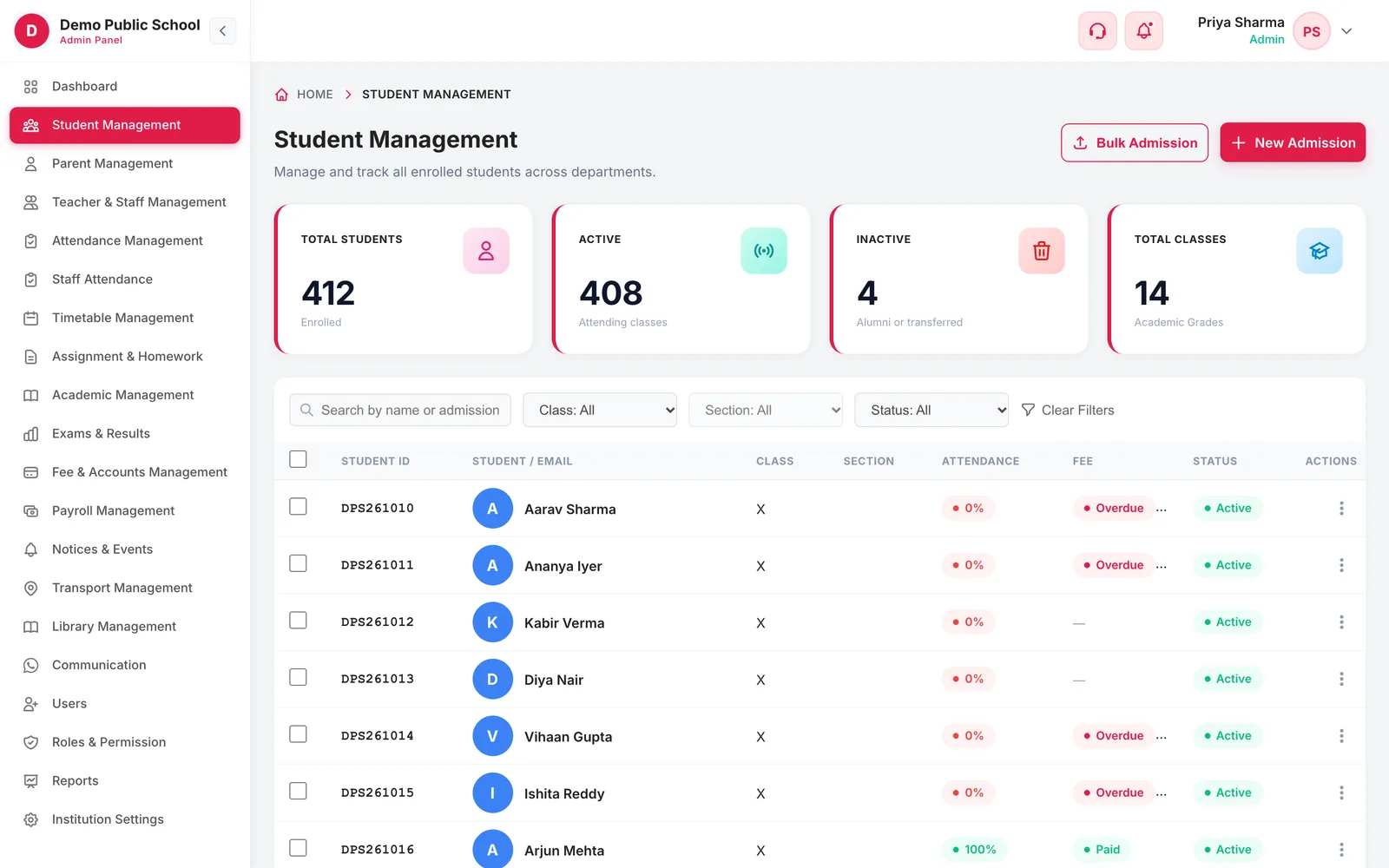
The directory lists every enrolled student with the two things the office is asked about most — attendance and fees — on the same row, so most questions are answered without opening a profile.
Search by student name or admission number
Filter by class, section and active or inactive status
Attendance percentage and fee status on every row
Totals for enrolled, active and inactive students, and classes
View, edit or reset a student's password from the row menu
02Student profile
One profile with the whole picture
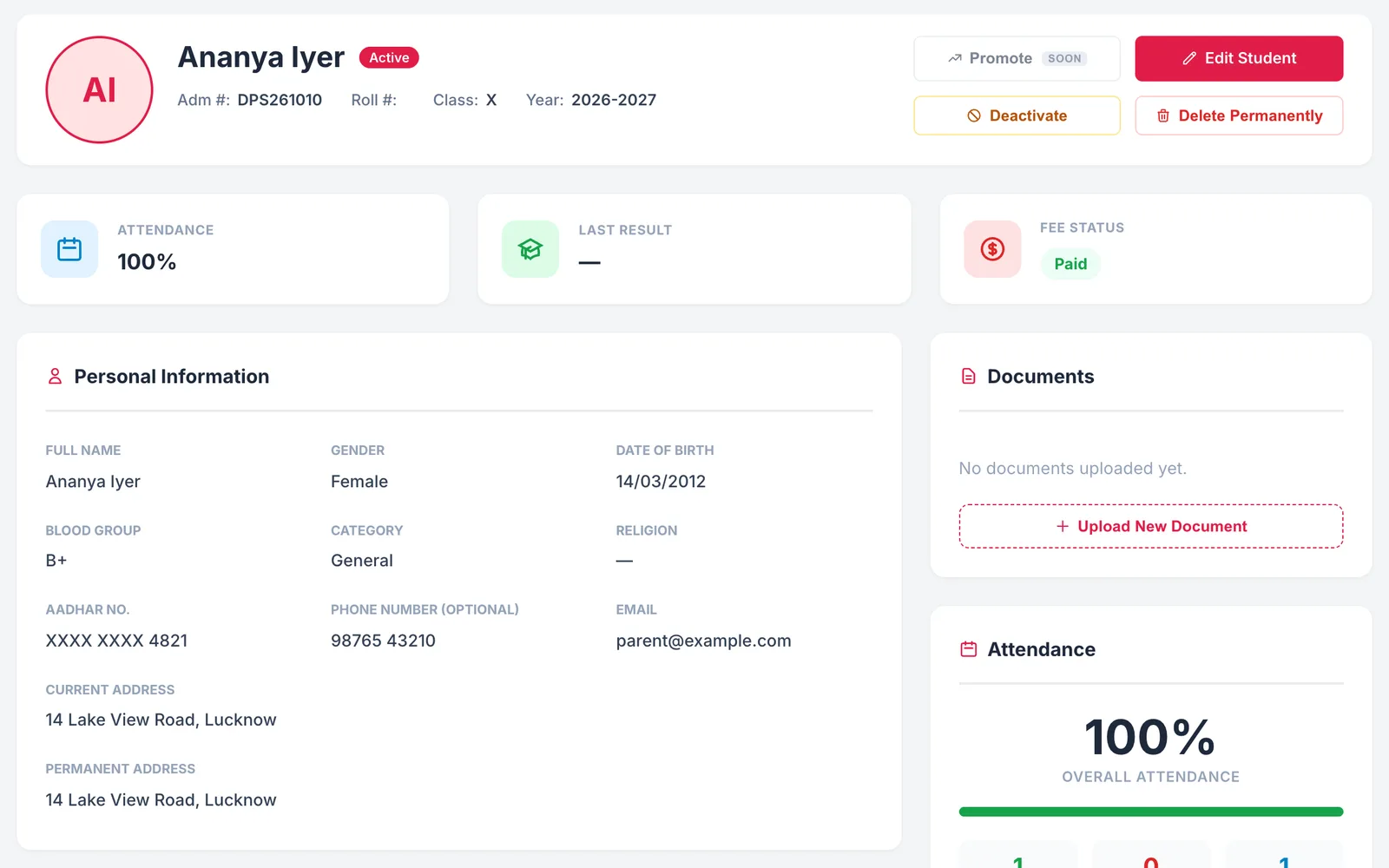
Open a student and everything is on one screen: who they are, how often they attend, what they owe and what they scored — drawn live from the attendance, fee and exam modules rather than copied into a register.
Admission number, class, academic year and status at the top
Attendance percentage with present, absent and total days
Fee status, total due and number of invoices
Last result from the exams module
Personal details: date of birth, gender, blood group, category, Aadhaar and addresses
Documents uploaded to the profile, with view and download
03Family and app access
Parents, guardians and logins in the same record
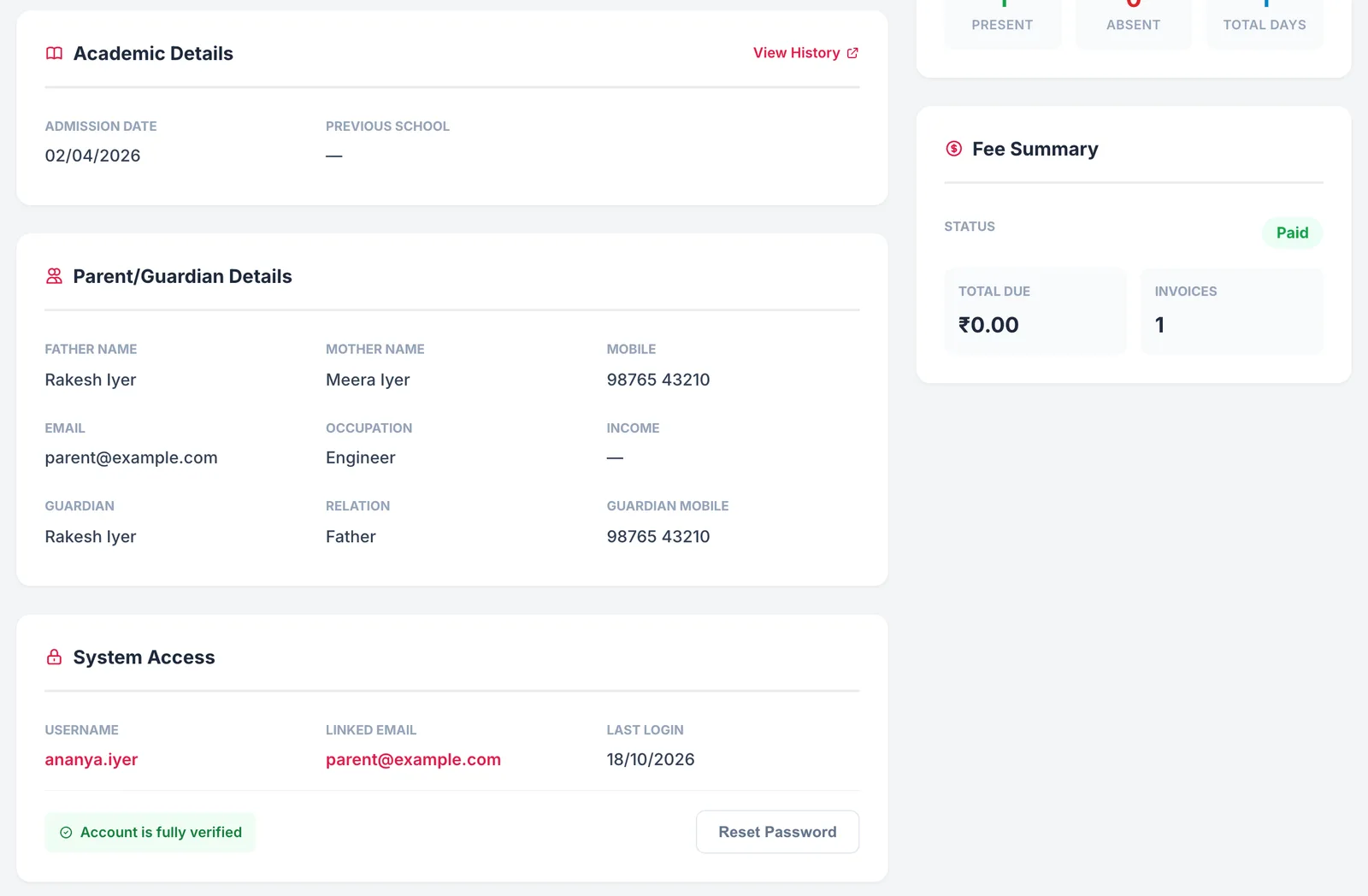
Family details live on the student's profile, so the office has the right number when it needs to call, and every student and parent account can be managed from the same place.
Father, mother and guardian with relation, mobile, email and occupation
Admission date, previous school and a link to the full academic history
Student username, linked email and last login
Account verification status and a one-click password reset
04Guided admission
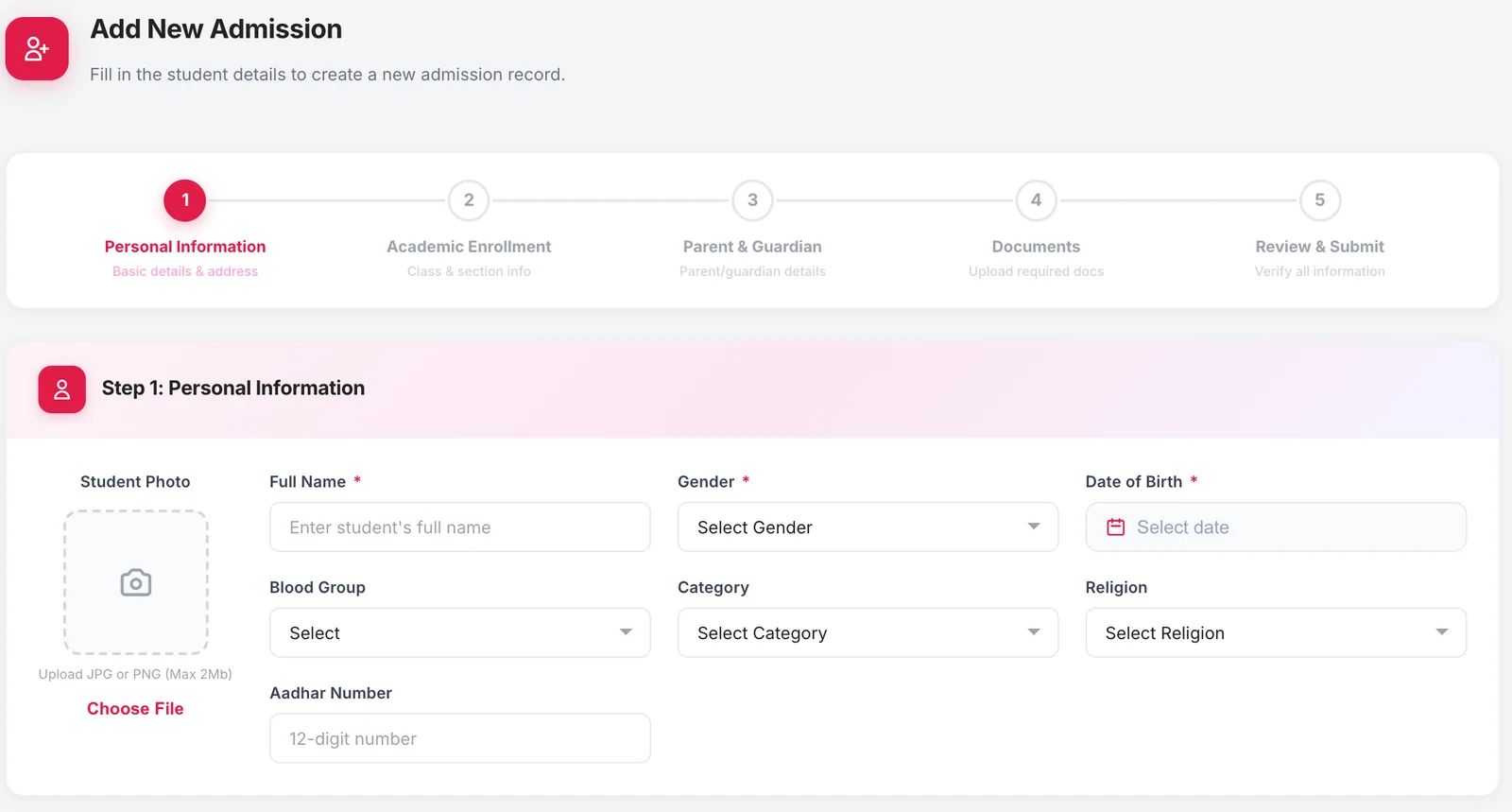
A five-step admission form that leaves nothing out
New admissions follow the same five steps every time, so every record arrives complete. When it is saved, the office sees the student's and the parent's login ID and password straight away, ready to hand over.
Personal information, academic enrolment, parent and guardian, documents, then review and submit
Student photo upload (JPG or PNG, up to 2 MB)
Required fields clearly marked on every step
Supporting documents attached to the admission itself
Student and parent login credentials shown on the confirmation screen
05Bulk admission
Bring your existing students across from a spreadsheet
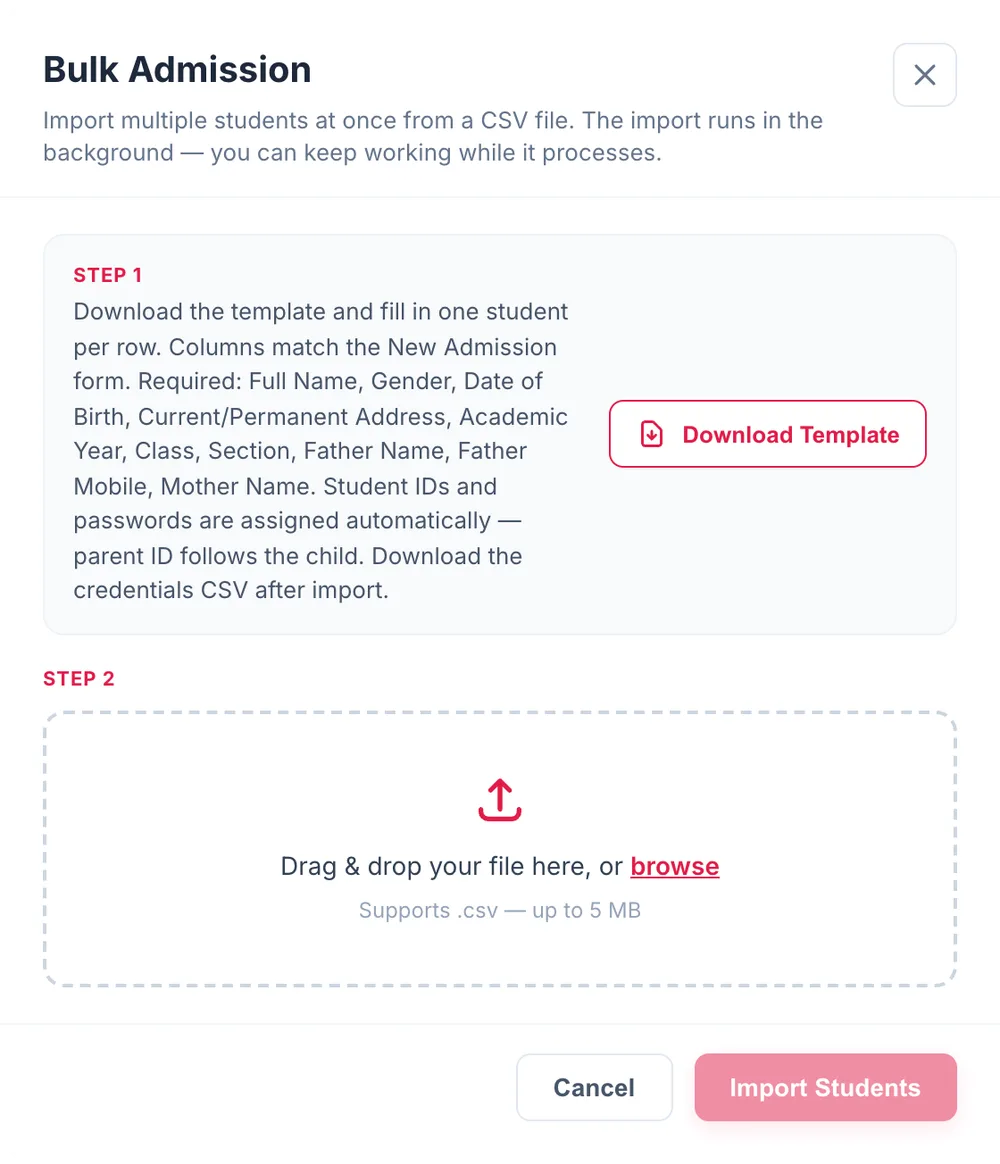
Moving from registers or Excel does not mean typing every student in again. Fill one row per student in the template and import the file; the import runs in the background while you keep working.
Download a CSV template whose columns match the admission form
Import files up to 5 MB
Student IDs and passwords assigned automatically, with the parent ID following the child's
Download a credentials file after the import to share logins with families
9:41
Responsive
The same screens on a phone
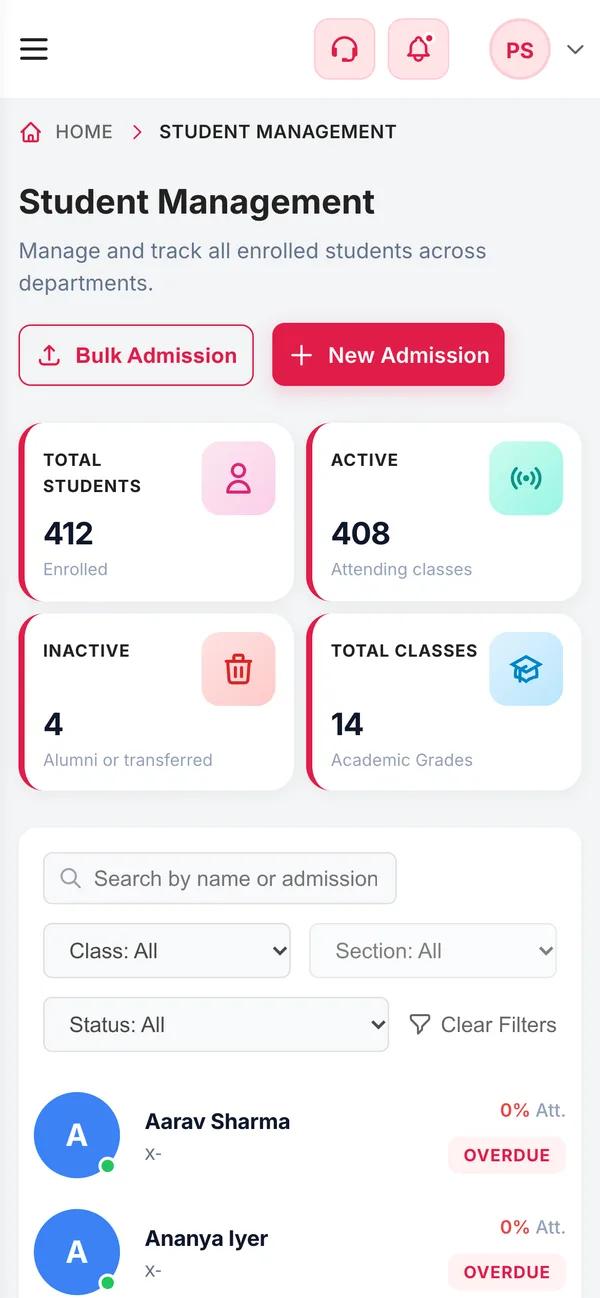
Staff are not always at a desk. The admin app adapts to small screens: the directory becomes a list of cards, and filters, search and admission work the same way on a phone or tablet as on a computer.
Directory switches to cards on narrow screens
Search and filters stay available
No separate app to install for office staff
Connected
Works with the rest of Campus 24x7
One student record is shared by every module, so nothing is typed twice.
Being clear about how this works saves surprises after you sign up.
Admissions are entered by your office, through the form or a CSV import. There is no online application form for parents today.
Promotion to the next class is done for whole classes in Academic Management, under Promotion / Year Rollover. Promoting a single student from their profile is coming soon.
Transfer certificates and year-by-year history are in Academic Management, linked from each student's profile.
FAQ
Questions schools ask
What is a student management system?
Software that keeps one complete record for each student — personal and family details, admission information, documents, attendance, fees and results — so the school office works from a single, current profile instead of separate registers.
Can we import our existing students from Excel?
Yes. Save your sheet as a CSV in the format of the downloadable template and import it from Bulk Admission. Files up to 5 MB are accepted, the import runs in the background, and student and parent login IDs and passwords are assigned automatically and can be downloaded afterwards.
Do students and parents get app access?
Yes. Every admission creates a student login and a parent login. In the Campus 24x7 app, parents see their children's attendance, fees, timetable, homework, exam schedule, results, notices and transport, and students see their own.
Can parents apply for admission online?
Not today. Admissions are entered by the school office through the five-step admission form or a CSV import.
What happens when a student leaves?
Mark the student inactive so they leave the active list while their record is kept, and issue the transfer certificate from Academic Management. Inactive students are counted separately as alumni or transferred.
Who can see student data?
Access is controlled by roles, so each staff member sees only the modules their role allows, and changes are recorded in audit logs — kept for 30 days on Foundation, 90 days on Growth and one year on Scale. Under the DPDP Act the school remains responsible for obtaining parental consent for children's data.
Which plan includes student management?
All of them. Plans differ by student capacity — up to 500, 1,000 or 2,500 students — and by the other modules included.
See your own students in Campus 24x7
Bring a sample of your student list to a demo and we will import it, so you can judge the profiles on your own data. The first two months cost ₹0.