SCHOOL ERP SOFTWARE IN LUCKNOW

School ERP software for Lucknow schools, built for the March crunch

A Lucknow school closes the year against a UP Board pattern, a CBSE one, or both — then promotes every class, reissues the section lists and hand-types a queue of transfer certificates, for parents who read Hindi first. Campus 24x7 configures both marking patterns in one account, promotes a whole cohort in bulk while keeping each student's history, and issues numbered TCs as PDFs.

UP Board and CBSE patternsHindi and English parent alertsFirst two months free
The Lucknow reality

What actually breaks in a Lucknow school office

Not hypotheticals — the four things principals and front-office staff here describe when the year is closing and the certificates are still being typed.

01

Two boards, two marking patterns, one term-end

Lucknow runs a deep UP Board base alongside a large CBSE sector, and plenty of schools sit a short walk apart running different patterns entirely. Each wants its own weightage and its own pass mark, so every term-end becomes two parallel spreadsheet exercises done by hand — usually in the fortnight before a PTM.

02

The year-end paperwork nobody has time for

March brings promotions, detentions, new sections and a queue of transfer certificates, each hand-typed and hand-numbered. A TC that goes out with the wrong admission date comes back weeks later, by which time the register it was copied from has been put away.

03

Fee follow-up that runs on a printed list

In the budget and mid-fee schools around Aliganj, Alambagh and trans-Gomti, the last week of every month goes on calling down a pending sheet. The sheet is stale by afternoon, two families get called twice, and nobody can say afterwards what was promised on which call.

The year-end run

Close the year without retyping it

Results, promotions and transfer certificates land in the same fortnight every March. These are four steps in one module, in the order a school actually hits them.

  1. Results

    Compute, review, publish

    Marks go in per subject, results compute into a card per student with rank and attendance, and the cards stay drafts until someone signs them off. If a mark was wrong, reopening hides the cards again and reopens entry.

  2. Promotion

    Move the whole year at once

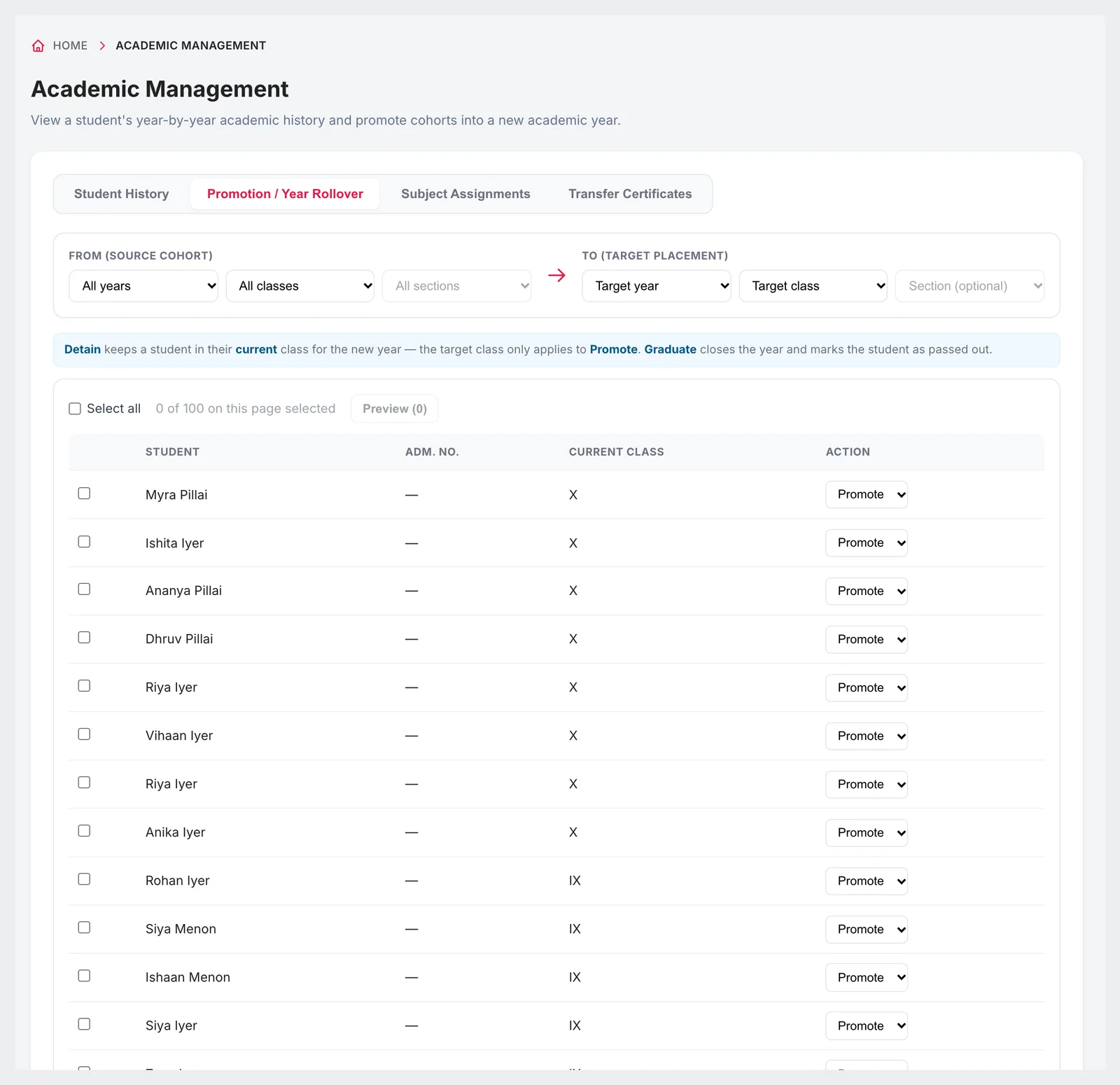
    Promote, detain or graduate in bulk rather than rebuilding your class lists by hand. Each student keeps a year-by-year history, so last year's section and marks do not disappear when this year's are written.

  3. Certificates

    A TC that is numbered, not typed

    Fill in the issue date, date of admission, date of leaving, conduct and reason, then save it as a draft for the principal or issue it straight away. Every certificate gets its own TC number and downloads as a PDF.

  4. Corrections

    Cancel without losing the trail

    An issued TC can be cancelled, and it stays on record with its cancelled status — so the register shows what happened rather than a gap where a certificate used to be.

Campus 24x7 Academic Management on the Promotion / Year Rollover tab, with Student History, Subject Assignments and Transfer Certificates alongside it, a from-cohort and to-placement selector, a note explaining that Detain keeps a student in their current class while Graduate marks them passed out, and a roster of 100 students in classes IX and X each with a Promote action
Promotion / Year Rollover: pick the source cohort, set the target placement, and promote, detain or graduate the selected students in one action.
Two boards, one term-end

Configure each marking pattern once, not every term

A UP Board annual pattern and a CBSE term pattern are different weightages, different pass marks and a different scale. Both are settings here, and both can sit in the same school.

UP Board

Annual pattern, marks-led. Set the pass percentage, give each subject its theory and practical split, and leave the scale on percentage bands.

CBSE

Term pattern with internals. Give the term its weightage, add an internal component alongside theory, and switch the same school's scale to the 10-point CGPA if that is how you report.

  • Teachers enter theory, practical and internal marks for their own subjects only
  • Results compute into a card per student: subject marks, total, percentage, grade, rank in section and class, and attendance
  • Cards stay drafts until you publish; reopening hides them again and reopens marks entry
  • Three card templates — traditional, modern and cumulative — each downloadable as a PDF
  • Publishing can fire the exam-result WhatsApp message to every parent in one step

A grading scale you define

Example
GradePercentage rangePoints
A191 – 10010
A281 – 909
B171 – 808
B261 – 707
C151 – 606

An illustration, not a board-issued table. The bands, their minimum and maximum, the points and the colours are all yours to set — or switch the whole scale to percentage bands or grades only.

What the exam module does not do

  • Board-specific report card formats are not built in. You pick one of the three templates and set your own grading bands.
  • There is no board template library and nothing that updates your formats when a board revises them.
  • Marks are entered by teachers in the web app. There is no OMR scanning or answer-sheet import.
Reaching Hindi-first parents

The notice that was read because it was in Hindi

An English circular in a diary reaches the parents who read English and surfaces on Saturday for everyone else.

  • Messages go from your school's own WhatsApp Business number, not a shared gateway number parents will not recognise
  • Templates in Hindi and English — Meta approves each one, in each language, during setup
  • Fee receipts, absence alerts, exam results and the daily overdue reminder go out on their own once switched on
  • Send to chosen classes and sections, or narrow by fee status — unpaid or overdue — before you send
  • Delivery status on every message: sent, delivered, read or failed, exportable as CSV

Worth planning for: WhatsApp only lets a business open a conversation with a template Meta has approved, and each language is approved separately. A Hindi version and an English version of the same notice are two submissions — we handle them during setup, but it is why the language list is settled early rather than switched on later.

This is about the messages parents receive. The apps themselves are in English.

What changes

The same seven jobs, done differently

AreaHow it runs on paperOn Campus 24x7
AdmissionsPaper forms, then re-typing the same details into ExcelA five-step form that creates the student record, class placement, roll number and parent login at once — or a CSV for the students you already have
AttendanceRegister marked in class, carried to the office, keyed in laterMarked on a phone at the classroom door; the parent alert goes out in the same minute
FeesCounter collection, handwritten receipts, a pending list printed each morningInvoices generated nightly with late fines applied, receipts sent on WhatsApp, and the overdue reminder running daily on its own
ExamsTwo marking patterns rebuilt in spreadsheets every termEach pattern configured once — weightage, pass mark, grading bands — then results compute and publish
Year-endClass lists retyped, TCs hand-written and hand-numberedBulk promotion with history kept, and numbered TCs issued as PDFs
Parent communicationEnglish notice in a diary, or a translation typed into a WhatsApp groupApproved Hindi and English templates from the school's own number, with delivery status on each
TimetableA grid drawn on paper, with clashes found once the term startsAuto-generated from subject assignments, with teacher double-booking and room clashes flagged before it goes live
Who this fits

Three ways Lucknow schools start

Budget and mid-fee schools going digital first time

  • Start with attendance, fees and WhatsApp in the first month
  • Bring existing students in by CSV rather than re-typing them
  • Parents get Hindi messages from a number they recognise

CBSE campuses running terms and internals

  • Term weightage and internal components set per subject
  • A 10-point CGPA scale with bands you define
  • Results publish to parents and fire the result message in one step

Schools running both boards, or several campuses

  • Two marking patterns configured side by side, in one account
  • One admin login to read the branches together or separately
  • The same fee heads, fine policy and templates applied everywhere
By the numbers

What you get, counted

7Template languages

English (US and UK), Hindi, Tamil, Telugu, Kannada and Malayalam, each approved by Meta separately.

3Grading scales

Percentage bands, a 10-point CGPA, or grades only — with the bands set by you.

6Automations that run themselves

Admission welcome, fee receipt, absence alert, exam result, daily overdue reminder and birthday wishes.

2 monthsFree to start

Every plan begins with two months free; regular billing starts from month three.

What it costs

Priced by student strength

Annual billing shown. Monthly is available on each plan, and every plan includes two months free. Most Lucknow schools start on Foundation; transport and live tracking begin at Growth.

Growth₹49,999 / year

Up to 1,000 students and 50 teachers & staff. Transport and live bus tracking start here.

Scale₹1,09,999 / year

Up to 2,500 students and 100 teachers & staff, with transport across every branch.

Campuses above 2,500 students are quoted individually. See the full plan comparison.

The platform

What every Lucknow school gets on day one

  • Role-based logins — principal, accountant, class teacher, librarian, transport in-charge — with defaults you can extend
  • Parent, student, teacher and driver apps on Android
  • Nightly invoice generation with your own late-fine policy applied
  • Documents stored on the student record, not in a shared drive
  • Encrypted storage with backups, and multi-branch support on one account
  • Marks, fees and attendance all exportable, so your data stays yours
Questions we get from Lucknow

Asked before every demo here

Does Campus 24x7 produce UP Board report cards?

Not board-branded ones — it is worth being precise about this, because it is the question we are asked most often here. Board-specific report card formats are not built in, and there is no template library that updates itself when a board revises its format. What you get is three result card templates (traditional, modern and cumulative) and a grading scale whose bands, points and pass marks you define yourself, plus a marks structure set per subject with theory, practical and internal components. That is enough to run a UP Board annual pattern and a CBSE term pattern side by side in the same school, and each card downloads as a PDF. If you need an exact board-issued layout, ask during the demo and we will show you the three templates against your current card so you can judge the gap yourself.

What does it actually cost?

Plans are priced by student strength and billed annually: Foundation at ₹29,999 for up to 500 students and 30 staff, Growth at ₹49,999 for up to 1,000 students and 50 staff, and Scale at ₹1,09,999 for up to 2,500 students and 100 staff. Every plan starts with two months free, with regular billing from month three, and monthly billing is available. Campuses above 2,500 students are quoted individually. If you have seen a lower figure quoted for a small-school tier, it was wrong — there is no sub-500-student plan.

Can we send messages to parents in Hindi?

Yes. Templates are supported in English (US and UK), Hindi, Tamil, Telugu, Kannada and Malayalam, and they go out from your school's own WhatsApp Business number. One thing to plan for: WhatsApp only allows a business to open a conversation with a template Meta has approved, and each language is approved separately — so a Hindi version and an English version of the same notice are two approvals. We handle the submissions during setup. Note this is about the messages parents receive; the apps themselves are in English.

Can parents pay fees online?

Yes. Parents can see their dues, payment history and receipts in the Campus 24x7 app, and the office can also record payments taken by cash, UPI, card, cheque or bank transfer so the ledger stays complete either way. Receipts go out on WhatsApp automatically, and invoices generate nightly with your late-fine policy applied.

Can parents apply for admission online?

Not today, and we would rather say so here than at the demo. Admissions are entered by your office through a five-step form, or in bulk from a CSV for students you already have. There is no public application form, no merit list, and nothing that tracks or chases prospective families before they are admitted. What the form does give you is everything downstream in one action: the student record, class placement, roll number, parent account and the logins for the parent and student apps.

Can we issue transfer certificates from the system?

Yes, and this is usually the part that saves a Lucknow office the most time in March. Choose the student, fill in the issue date, date of admission, date of leaving, conduct, reason for leaving and any remarks, then either save it as a draft for the principal to check or issue it immediately. Every certificate gets its own TC number and downloads as a PDF. If one was issued in error it can be cancelled, and it stays on record with its cancelled status rather than vanishing.

How does the timetable get built?

Either way round. You can fill the grid by hand, or let Campus 24x7 auto-generate it from your subject assignments — which teacher teaches which subject to which class and section. Teacher double-booking, room clashes and class collisions are flagged so you clear them before the timetable goes live, and once it does, parents and students see it in the app.

How long does setup take?

It depends mostly on one thing: how clean your existing student data is. Most schools begin with attendance, fees and communication, then add exams and the timetable. Bringing existing students in is a CSV import — download the template, fill one row per student, upload it — and files up to 5 MB are processed in the background, with the generated logins downloadable afterwards. Tidying that spreadsheet is almost always the longest single step, so it is worth starting there.

See it running on your own marking pattern

We will set up a demo with your classes, your fee heads and your actual grading bands — both boards, if you run both — so you are not looking at sample data. Your first two months cost nothing.