Student Attendance Software with Same-Day Parent Alerts
Mark a class in one tap, correct a mistake with a recorded reason, and let parents of absent children hear about it on WhatsApp the same day. Parents and students can also see in the app how their attendance compares with your exam threshold.
1 tapWhole class presentThen change only the absentees
1 alertPer absent child, per dayRe-saving the register never sends it twice
3 viewsDaily, weekly, monthlyFor any date, class and section
75%Typical exam thresholdSet your own minimum in settings
How it works
From setup to everyday use
1
Set your rules once
Choose the minimum attendance needed to sit exams and how it is calculated, in Institution Settings.
2
Mark the register
Pick the date, class and section, mark everyone present, then change the few who are absent.
3
Parents are told
If WhatsApp is connected, parents of absent children receive the absence alert template automatically.
4
Fix mistakes properly
Corrections are made student by student with a reason, and the last correction stays visible on the roster.
What it does
Inside Student Attendance
Real screens from the Campus 24x7 admin app. Names and contact details are sample data.
01Daily roster
Mark a class in seconds, not minutes
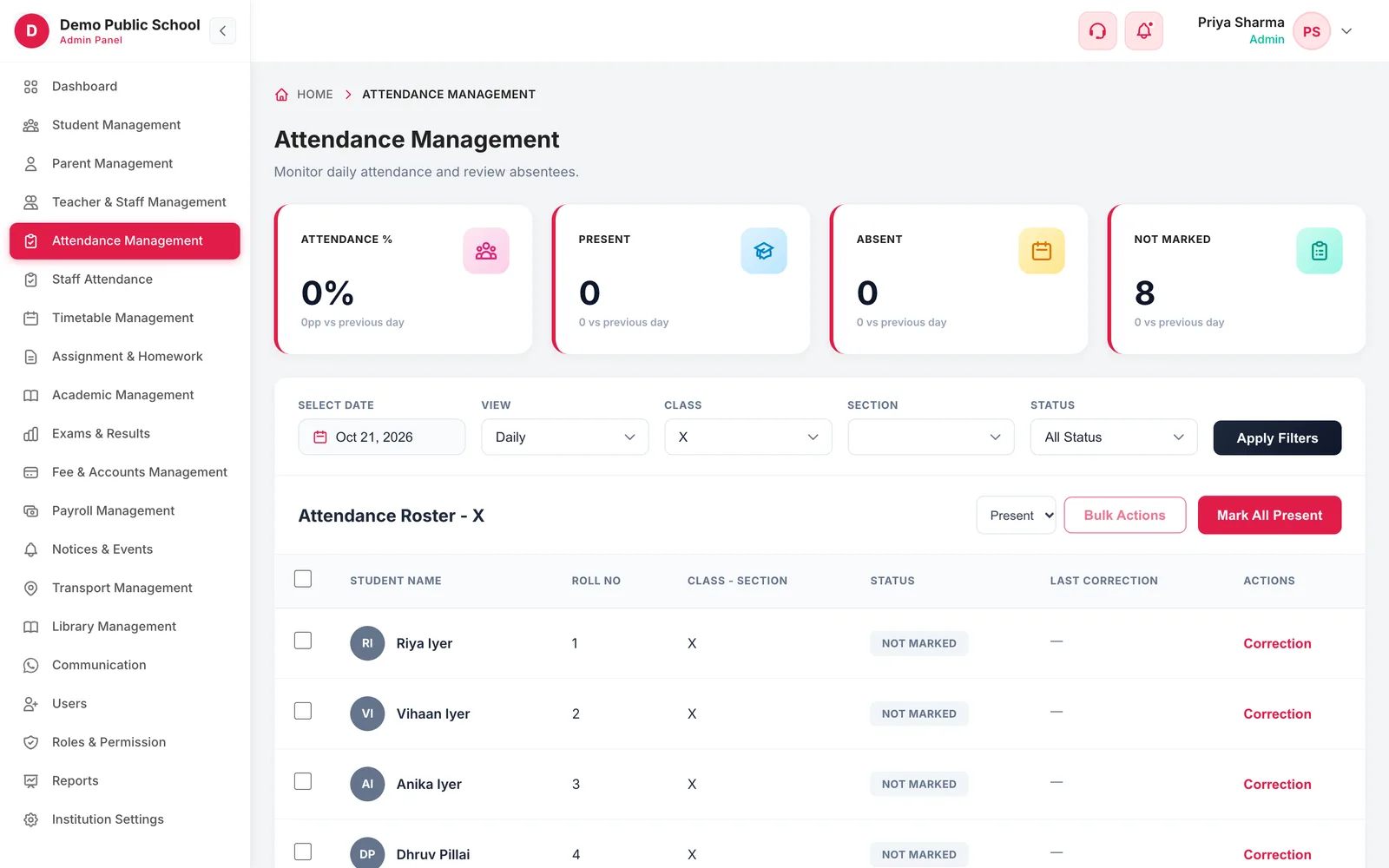
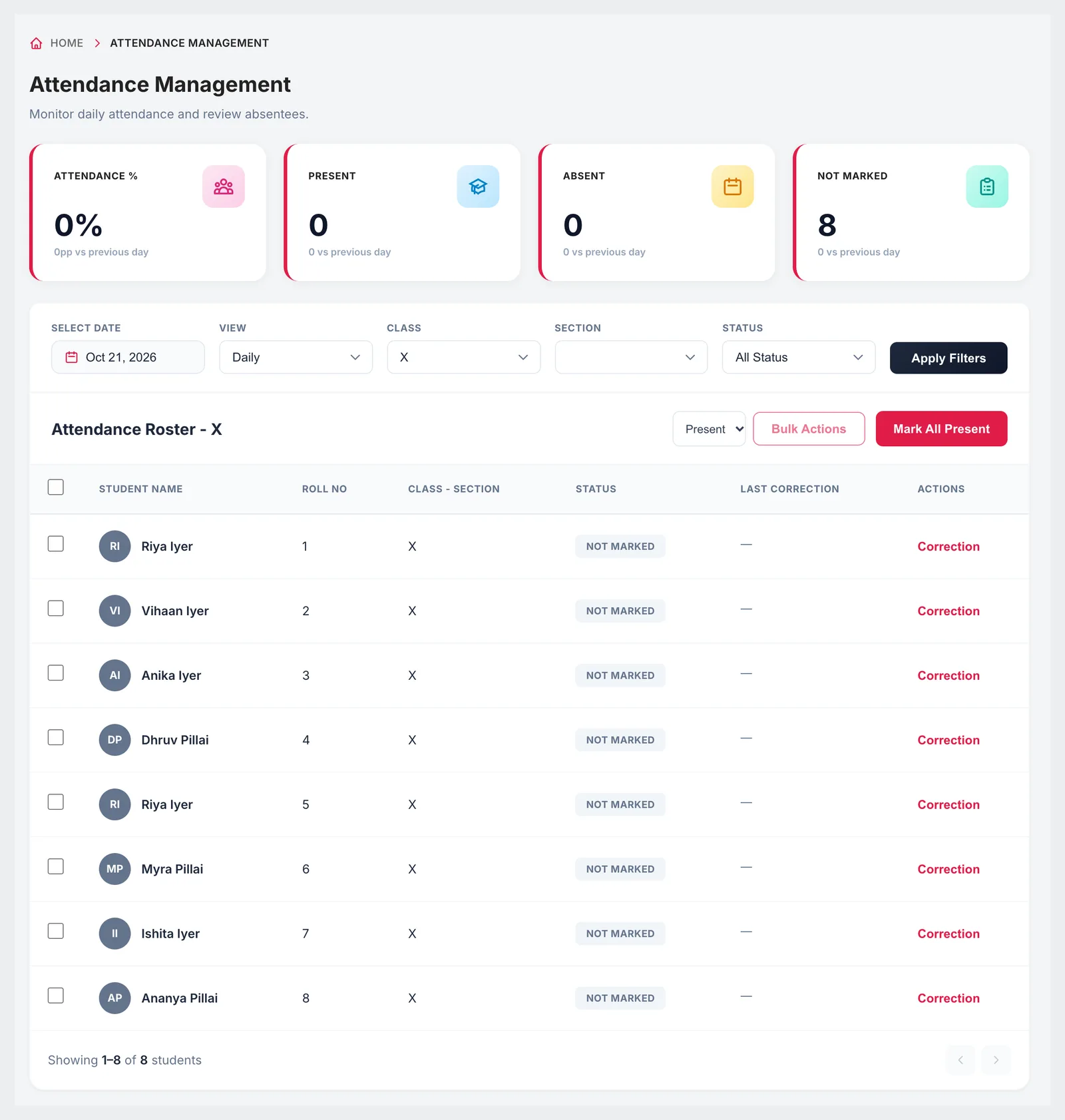
Choose a date, class and section and the roster lists every student with their roll number and status. Most days most children are present, so start with Mark All Present and then change the handful who are not — or select several students and apply a status to all of them together.
Filter by class, section and status
Mark All Present, then change only the exceptions
Bulk actions for several students at once
Totals for attendance %, present, absent and not marked, compared with the previous day
02Corrections
Every change has a reason on record
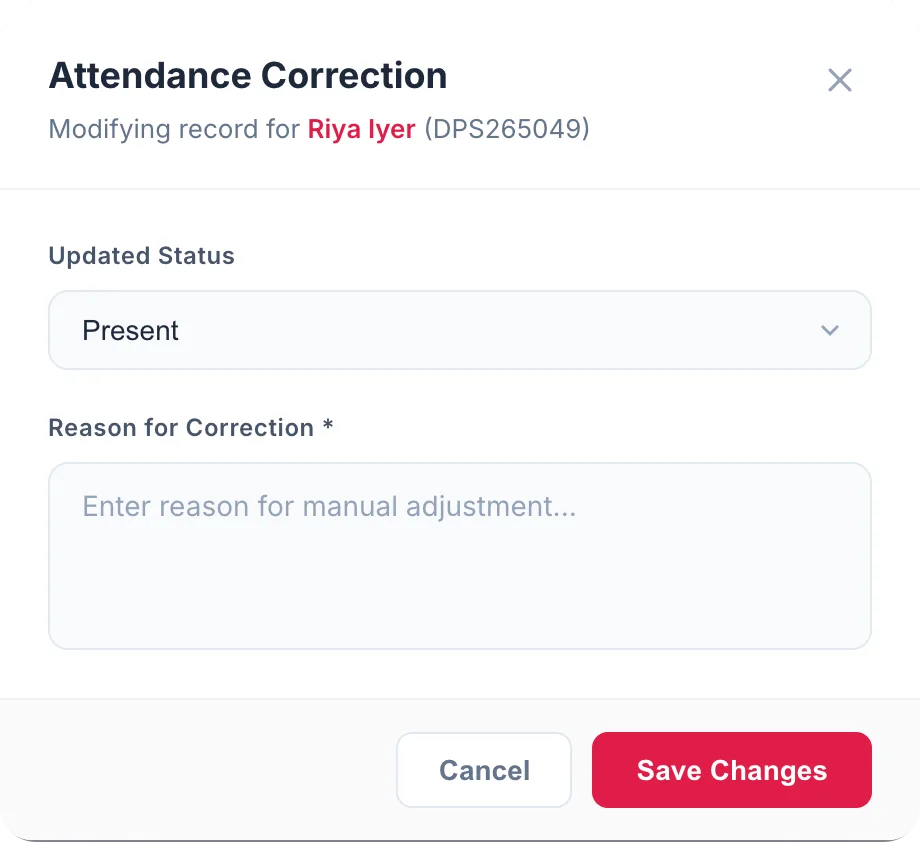
Attendance feeds exam eligibility and is what parents dispute, so it should not be silently overwritten. A correction is made against one student and cannot be saved without a reason. The roster shows the last correction next to each child, so a class teacher can see at a glance what was changed.
Correction per student, with a mandatory reason
Last correction shown on the roster
Present and absent both correctable
Each correction stores the old and new status, the reason and who made it
03Parent alerts
Parents hear about an absence the same day
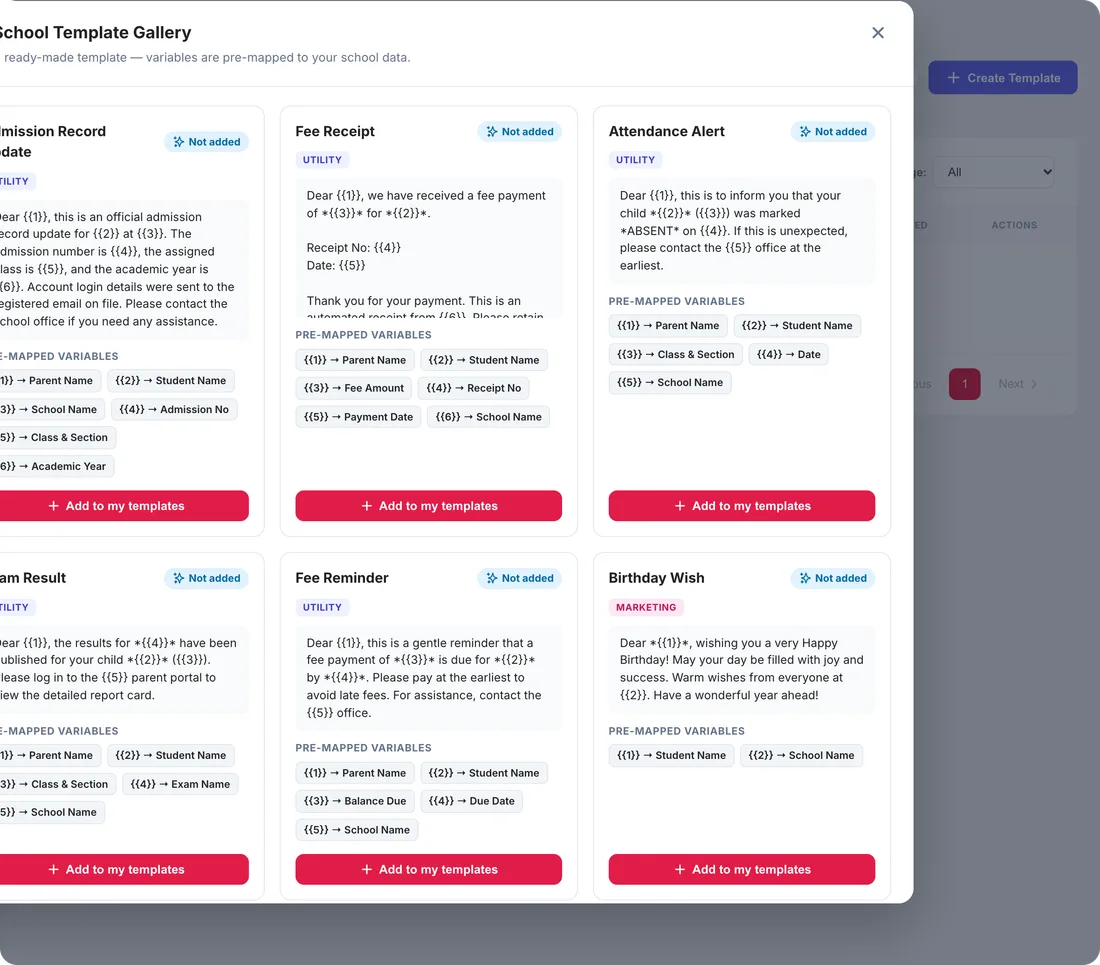
When your school's WhatsApp Business number is connected, marking a student absent fires the ready-made absence alert: the parent receives the student's name, class and section, the date and your school's name from your official number. Each child triggers at most one alert per day, even if the register is saved again.
Sent from the school's own WhatsApp Business number
Ready-made absence alert template with fields already mapped
At most one alert per child per day
Delivery recorded in WhatsApp delivery logs
04Attendance rules
A threshold that means something
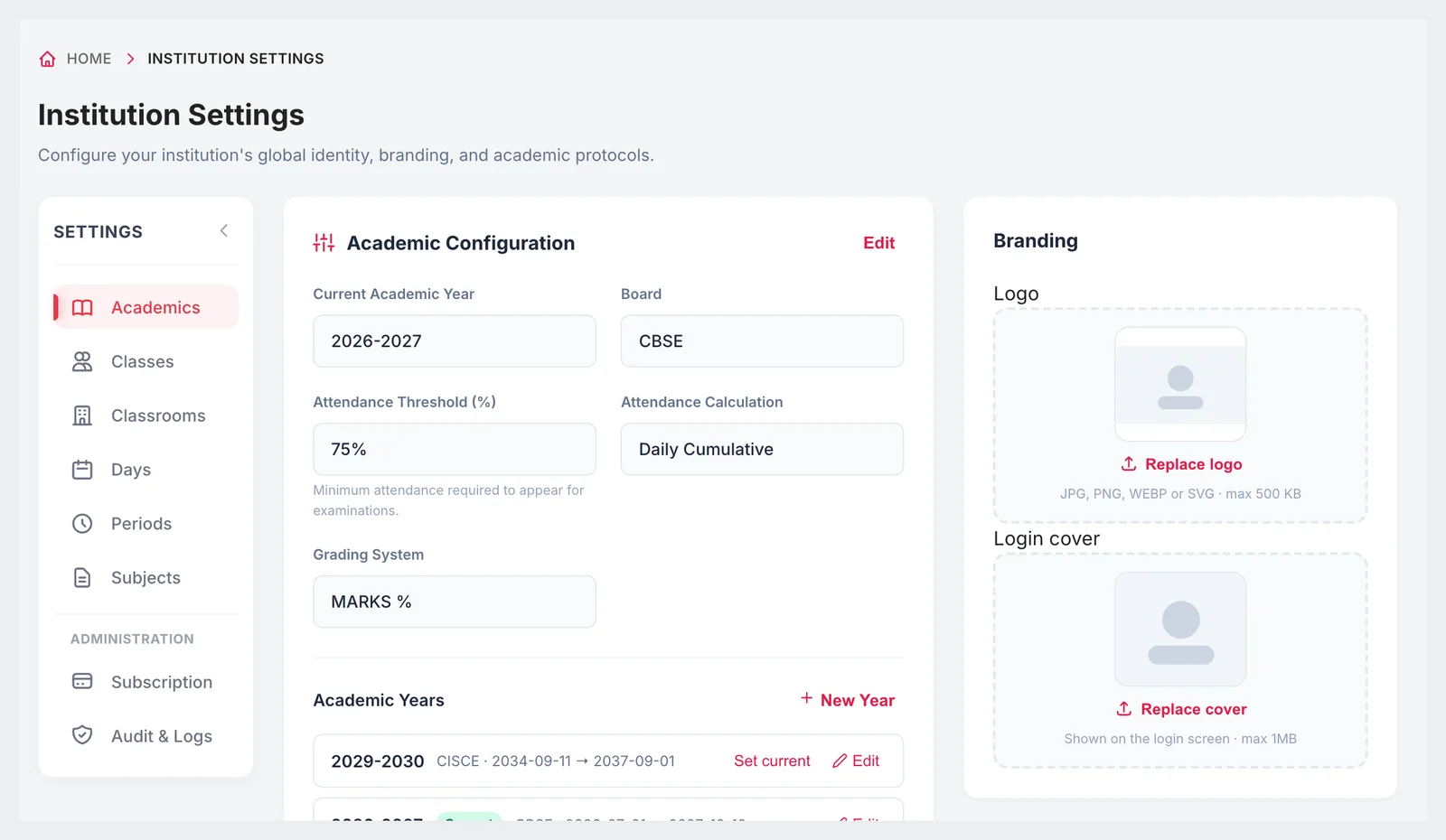
In Institution Settings you set the minimum attendance a student needs to appear for examinations and how attendance is calculated, alongside the academic year, board and grading system. Parents and students then see the year-to-date percentage against your threshold in the Campus 24x7 app, with a warning when it falls below.
Attendance threshold as a percentage, for exam eligibility
Calculation: daily cumulative, subject-wise or monthly average
Set for the current academic year, alongside the board and grading system
Year-to-date attendance against the threshold in the parent and student app
9:41
Responsive
Take the register from the classroom
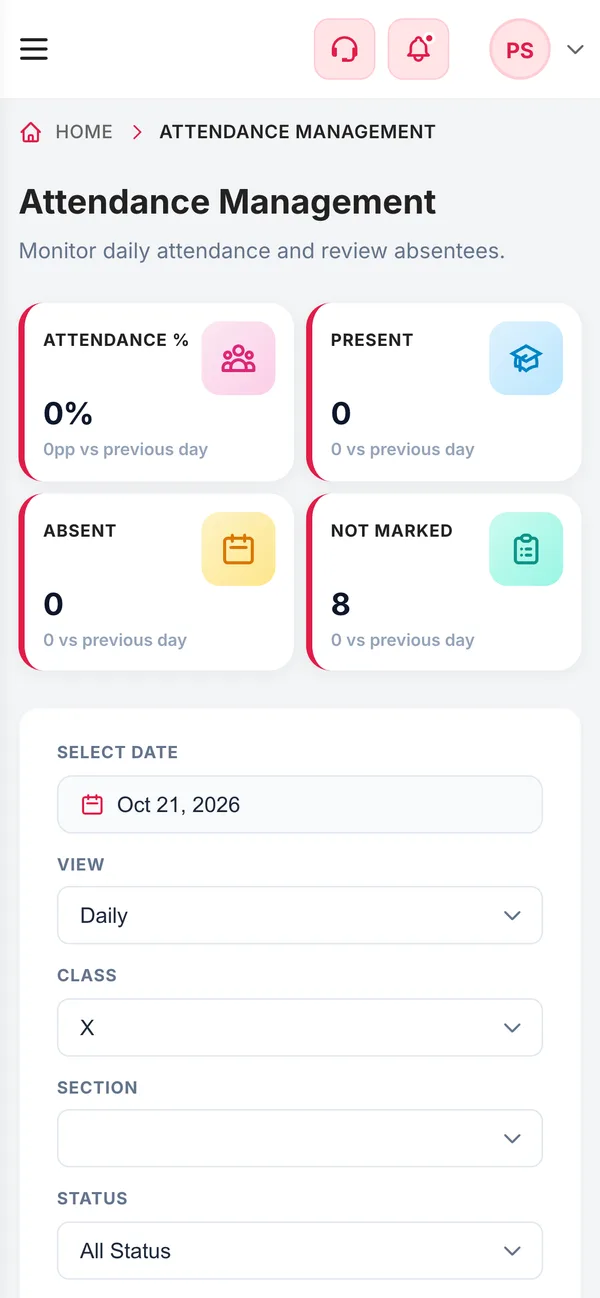
Teachers don't need to walk to the staff room to mark attendance. The roster works on a phone browser, so a class teacher can mark the class at the door and the office sees the numbers straight away.
Same roster on a phone
Totals update as soon as the register is saved
Teachers see only what their role allows
Connected
Works with the rest of Campus 24x7
Attendance is recorded against the same student record used for exams, messages and reports.
Absence alerts need your school's WhatsApp Business number connected and the attendance alert template approved by Meta.
Attendance is marked by staff in the web app. There is no biometric, RFID or face-recognition attendance.
Attendance reports in the Reports module are marked as coming soon; today you review attendance in the daily, weekly and monthly views.
FAQ
Questions schools ask
How long does it take a teacher to mark attendance?
For a typical class, a few seconds: mark everyone present in one tap, then change the students who are absent.
Do parents get a message when their child is absent?
Yes, if your school's WhatsApp Business number is connected. Marking a student absent sends the absence alert to the parent from your official number, at most once per child per day.
Can attendance be changed after it is marked?
Yes, through a correction for the individual student. A reason is required, and the last correction is shown on the roster.
Can we set a minimum attendance for exams?
Yes. The attendance threshold percentage and the calculation method are set in Institution Settings → Academics, and parents and students see the year-to-date percentage against it in the app.
Can we see attendance for a week or a month?
Yes. The attendance page has daily, weekly and monthly views for any class and section.
Does Campus 24x7 support biometric or RFID attendance?
No. Attendance is marked by staff in the app, on a phone or a computer.
Is staff attendance included too?
Yes. Staff attendance has its own page with present, absent, late, half-day and leave statuses.
See a class marked in seconds
We'll mark a sample class in the demo and show you the parent alert that goes out. The first two months cost ₹0.