School Fee Management Software with Automatic Invoices and Fines
Define each fee plan once and Campus 24x7 raises the invoices on the billing day, adds late fines after your grace period, records every payment against the right student with a numbered receipt, and reminds parents of overdue fees on WhatsApp.
6Billing frequenciesMonthly to yearly, one-time or custom months
NightlyInvoices and finesRaised on the billing day, fines after the grace period
7Concession typesScholarship, sibling, staff ward and more
7Payment modes recordedCash, UPI, card, cheque, bank, online, wallet
How it works
From setup to everyday use
1
Set up fee plans
Fee name, class or selected students, frequency, amount or heads, billing day, due day and an optional fine policy.
2
Invoices go out
On each plan's billing day, invoices are created for every student it applies to, without duplicates.
3
Collect at the counter
Search a student, tick the dues, choose the payment mode and print a numbered receipt.
4
Follow up
Fines apply after the grace period, and parents with overdue fees get a WhatsApp reminder each morning.
What it does
Inside Fees & Accounts
Real screens from the Campus 24x7 admin app. Names and contact details are sample data.
01Overview
Collections and dues on one screen
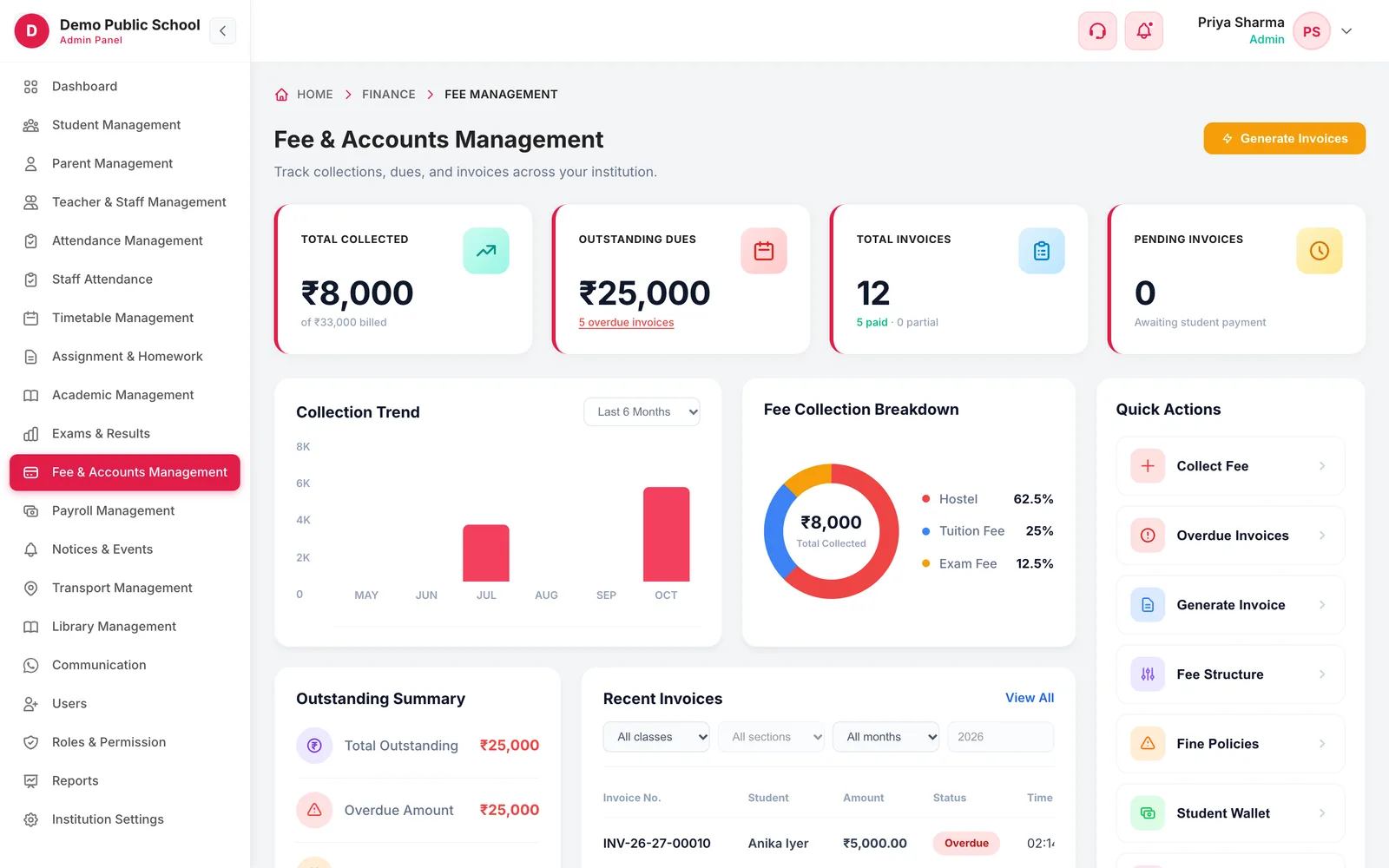
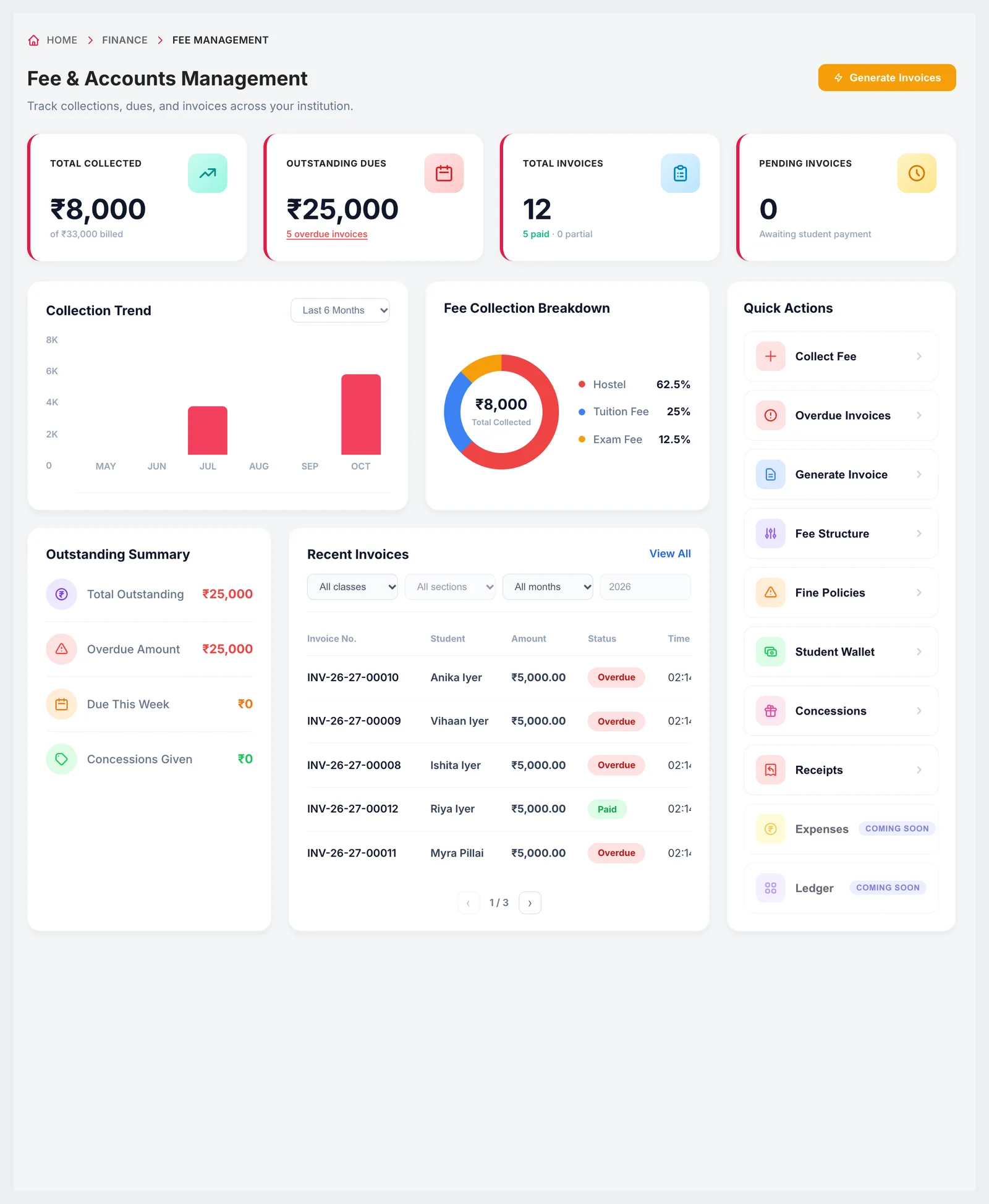
The overview shows what has been collected against what was billed, the outstanding dues and how many invoices are overdue, with a six- or twelve-month collection trend and a breakdown of collections by fee head. An outstanding summary separates overdue amounts, what is due this week and concessions given, and recent invoices can be filtered by class, section and month.
Total collected against total billed
Outstanding dues and overdue invoice count
Collection trend over 6 or 12 months
Collection breakdown by fee head
Recent invoices filtered by class, section and month
02Fee structure
Fee plans that bill themselves
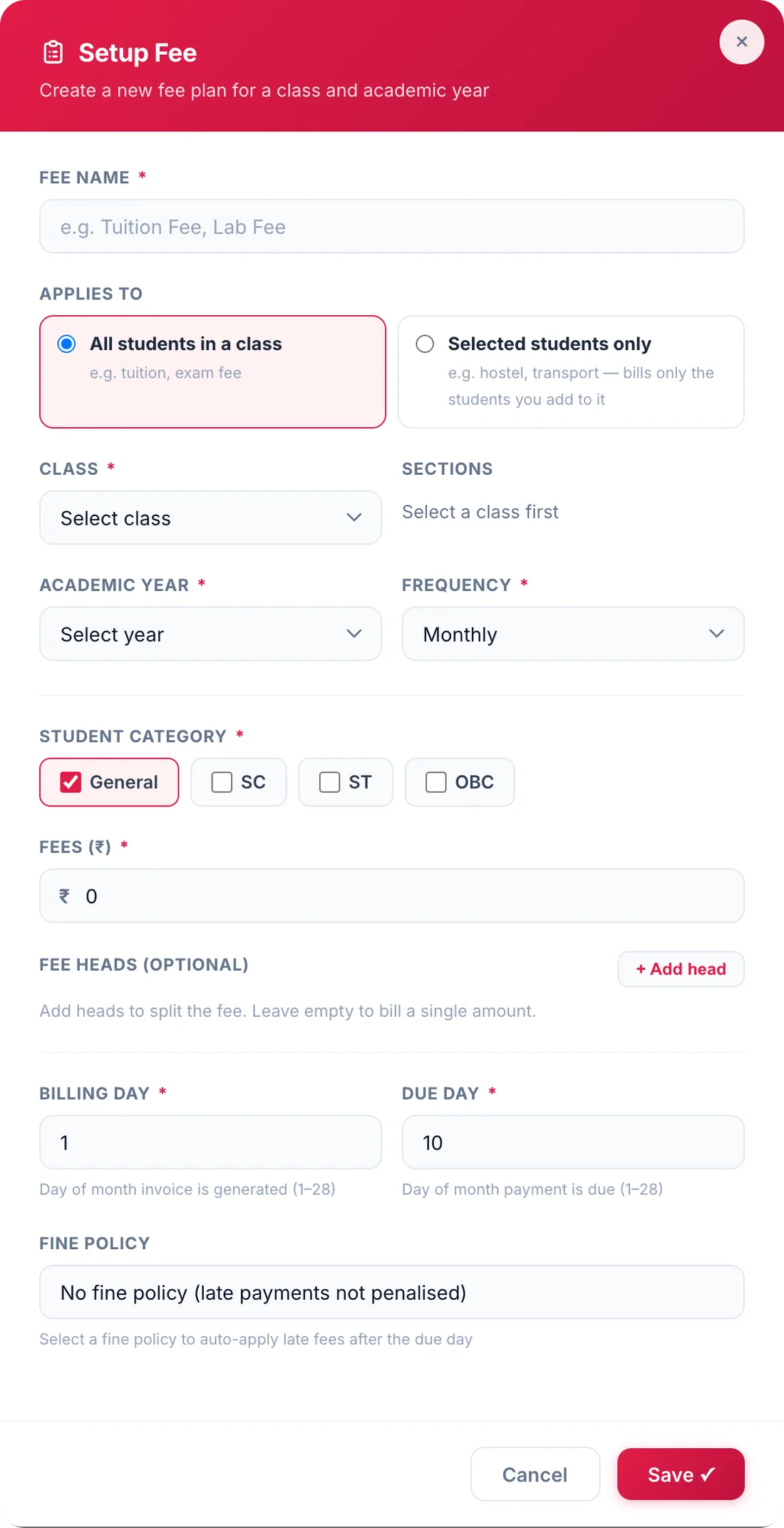
A fee plan applies either to every student in a class — tuition, exam fee — or only to the students you add, such as transport or hostel. Choose the sections, academic year, frequency and student category, enter one amount or split it into heads, and set the billing day and due day. Published plans then raise invoices automatically every billing day.
All students in a class, or selected students only
Monthly, quarterly, half-yearly, yearly, one-time or custom months
Student category: General, SC, ST or OBC
Optional fee heads to split the amount
Billing day and due day between the 1st and the 28th
Draft, published and archived plans
03Fee counter
Collect a payment in under a minute
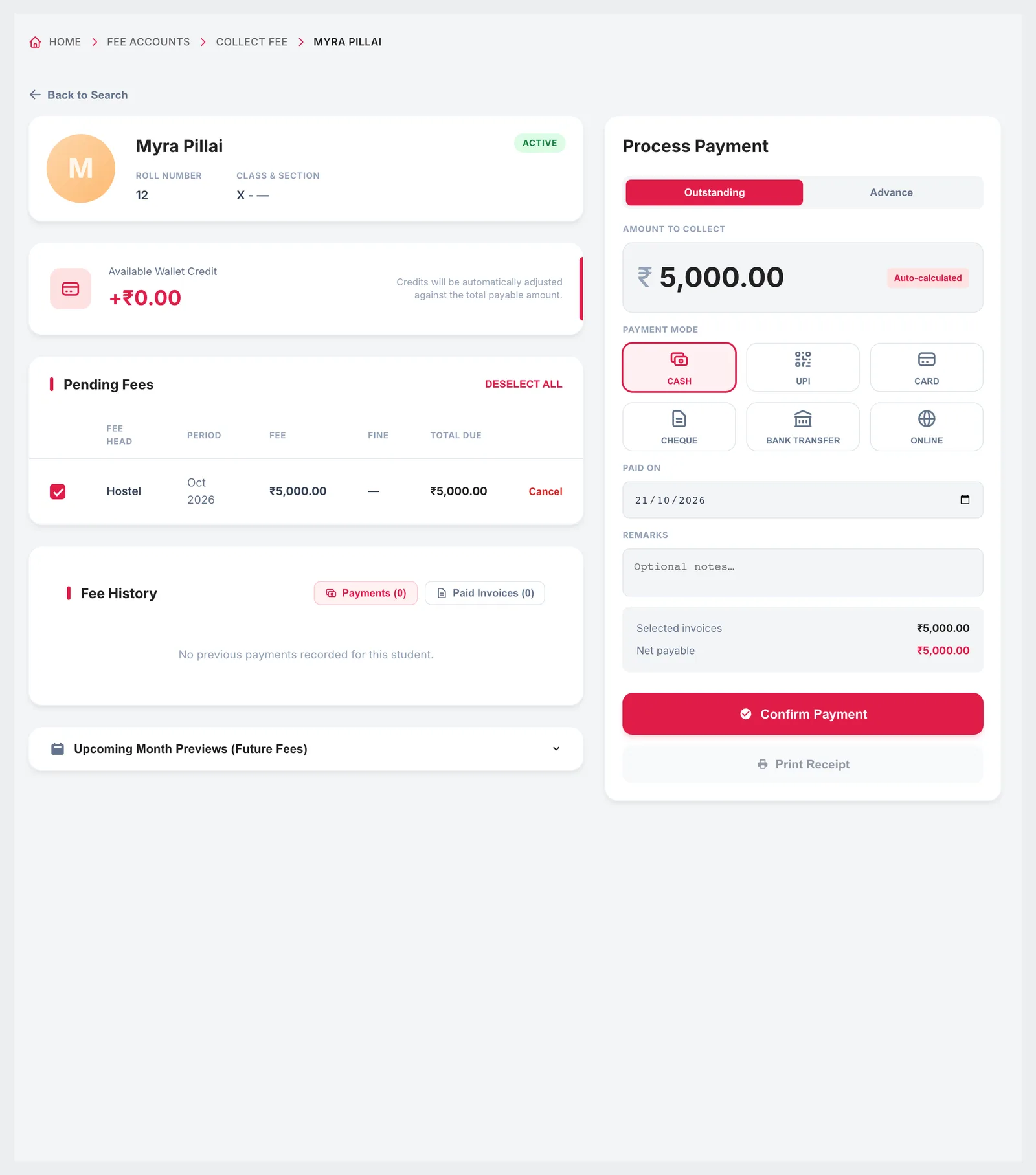
Search a student by name, roll number or ID and their pending fees appear with the fee, fine and total due for each period. Tick what is being paid, choose the payment mode and date, add a remark and confirm — any wallet credit is adjusted automatically, and the receipt can be printed straight away. Advance payments for future months are taken from the same screen.
Pending fees with fee, fine and total due
Cash, UPI, card, cheque, bank transfer or online transfer
Wallet credit adjusted against the payable amount
Advance payments and a preview of upcoming months
Print the receipt immediately
04Receipts
Every receipt numbered, and every correction recorded
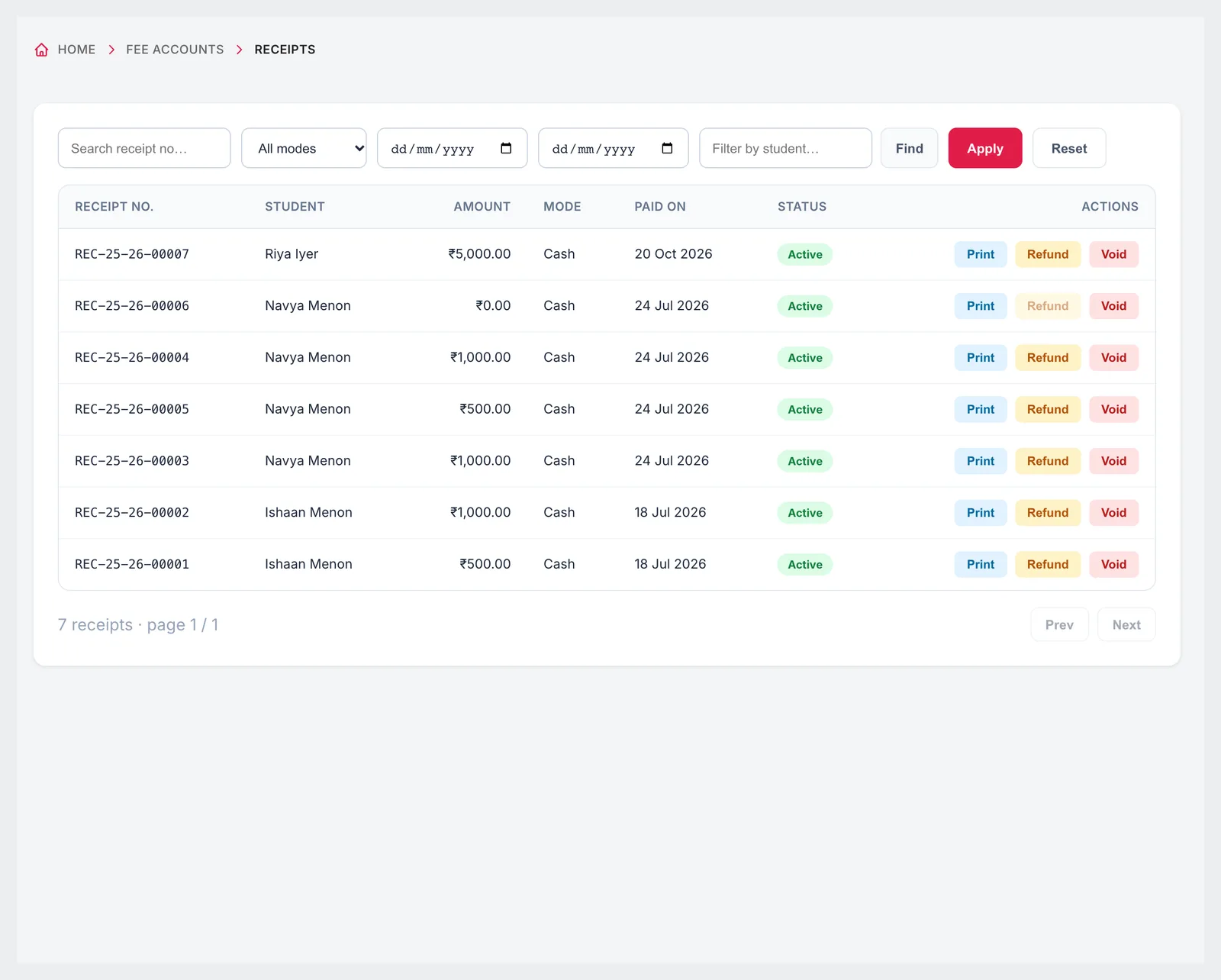
Each payment produces a numbered receipt that can be printed as a PDF. Receipts can be filtered by payment mode and searched, and a wrong entry is not deleted: it is voided or refunded, so the record of what happened stays intact. If WhatsApp is connected, the parent receives the fee receipt message as soon as the payment is recorded.
Sequential receipt numbers per academic year
Filter by cash, cheque, online, UPI, card, bank transfer or wallet
Print, refund or void
Fee receipt message to the parent on WhatsApp
05Concessions and fines
Discounts with approval, fines without arguments
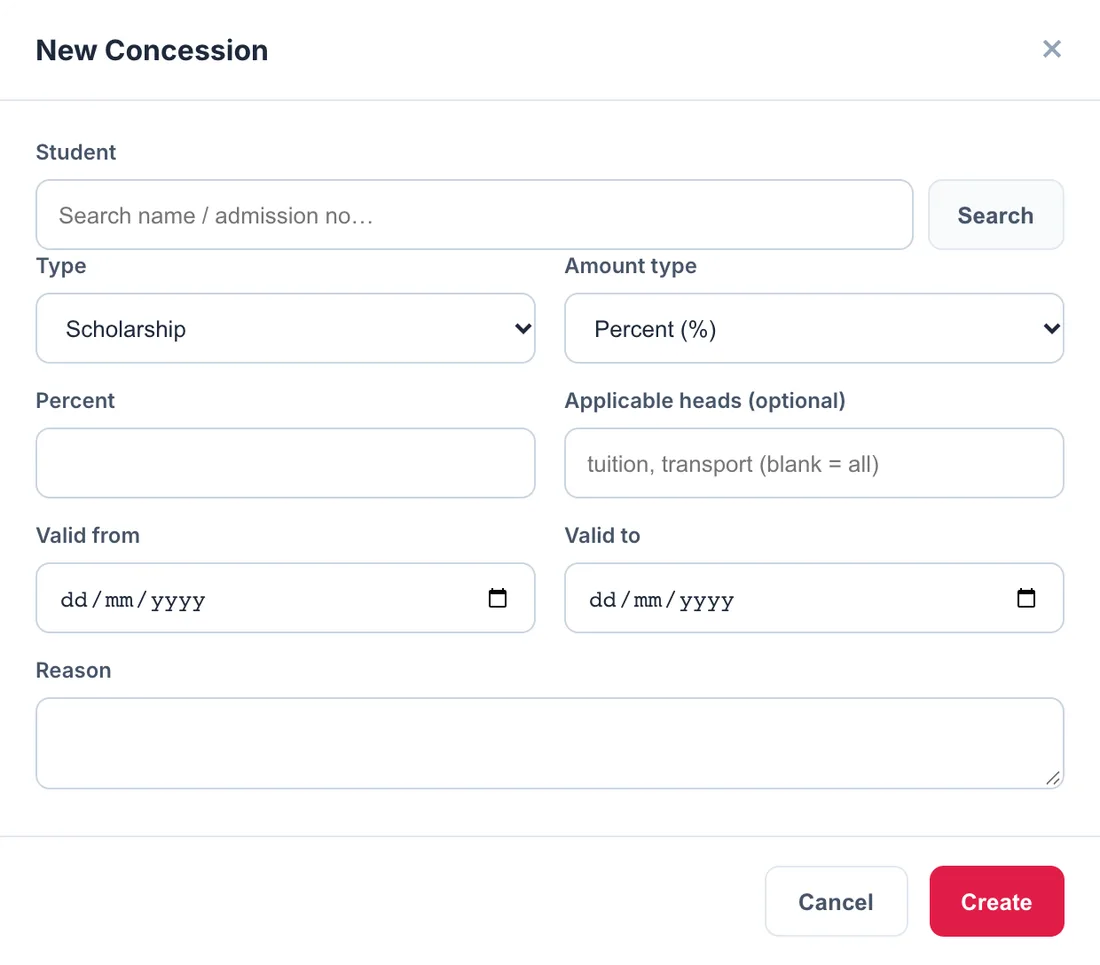
Concessions are recorded per student with a type, a percentage or flat amount, the fee heads they apply to, a validity period and a reason, and they wait for approval before taking effect. Fine policies are defined once — a flat amount or a daily charge with an optional cap — with grace days, and attached to any fee plan.
Scholarship, sibling discount, staff ward, merit, need based, sports quota or other
Percentage or flat concessions on chosen heads
Pending, approved and rejected concessions
Flat or per-day fines with grace days and a maximum cap
Fines added automatically each night after the grace period
9:41
Responsive
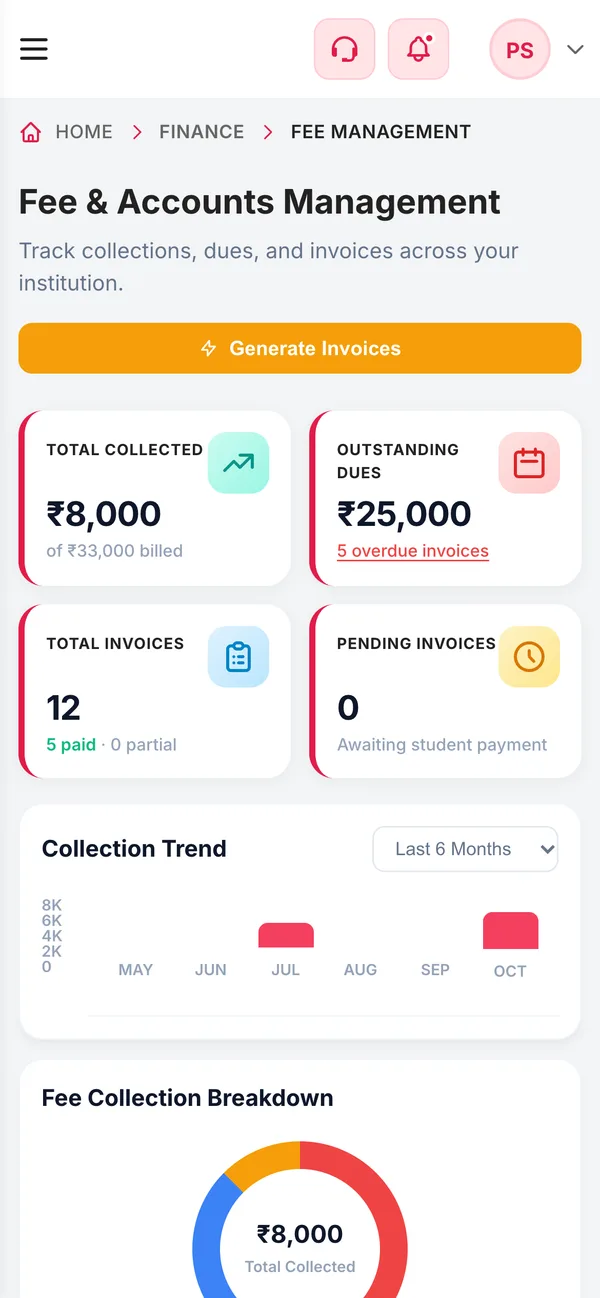
Today's collection on the principal's phone
The fee overview and the collect screen work in a phone browser, so the principal can check today's collection and outstanding dues from anywhere, and parents can see what is due in the Campus 24x7 app.
Collection and dues on a phone
Fee details and history in the parent app
Access limited by role
Connected
Works with the rest of Campus 24x7
Fees are billed to the same students, parents and classes used everywhere else in Campus 24x7.
Parents can see their dues in the Campus 24x7 app but cannot pay inside it yet; payments are recorded by the school.
Expense tracking and a general ledger are marked as coming soon.
WhatsApp receipts and overdue reminders need your WhatsApp Business number connected and the templates approved.
Once a plan has invoices you can still change its name, amounts and dates, but not who it applies to or how often it bills; archive it and create a new plan for that.
FAQ
Questions schools ask
Does Campus 24x7 generate fee invoices automatically?
Yes. Every night it creates invoices for each published fee plan whose billing day has arrived, for every student the plan applies to. Running it again never creates a duplicate for the same student, plan and period.
How are late fines calculated?
Through fine policies: a flat amount or a daily charge with an optional maximum, starting after the grace days you set. Fines are added automatically each night.
Can parents pay fees online?
Not inside the app yet. Parents can see their dues and payment history in the Campus 24x7 app, and the school records payments by cash, UPI, card, cheque, bank transfer or online transfer.
Do parents get reminders for overdue fees?
Yes, if WhatsApp is connected. The daily fee reminder automation messages parents of students with overdue fees each morning, with the balance and due date.
How do sibling discounts and scholarships work?
Add a concession for the student with its type, a percentage or flat amount, the fee heads it covers and its validity. It applies once approved.
Can a receipt be cancelled?
A receipt is never deleted. It can be voided if it was entered by mistake, or refunded if money was returned, and both stay on record.
Can we bill transport or hostel fees only to some students?
Yes. Choose 'Selected students only' when setting up the fee plan and add the students it should bill.
Is there a student wallet?
Yes. Advance payments and manual credits sit in the student's wallet and are adjusted automatically against the next payment.
See your fee structure set up in a demo
Bring one class's fee structure and we'll set it up, raise the invoices and collect a sample payment. The first two months cost ₹0.