School ERP Dashboard and Finance Reports

Open Campus 24x7 and see the school at a glance — today's attendance and collection, overdue invoices, expected against collected fees, plan usage and the latest changes — then pull fee collection and outstanding dues reports for any date range and export them as CSV.

  • Today's attendance and collection
  • Expected vs collected fees
  • Fee collection and dues reports
  • CSV export
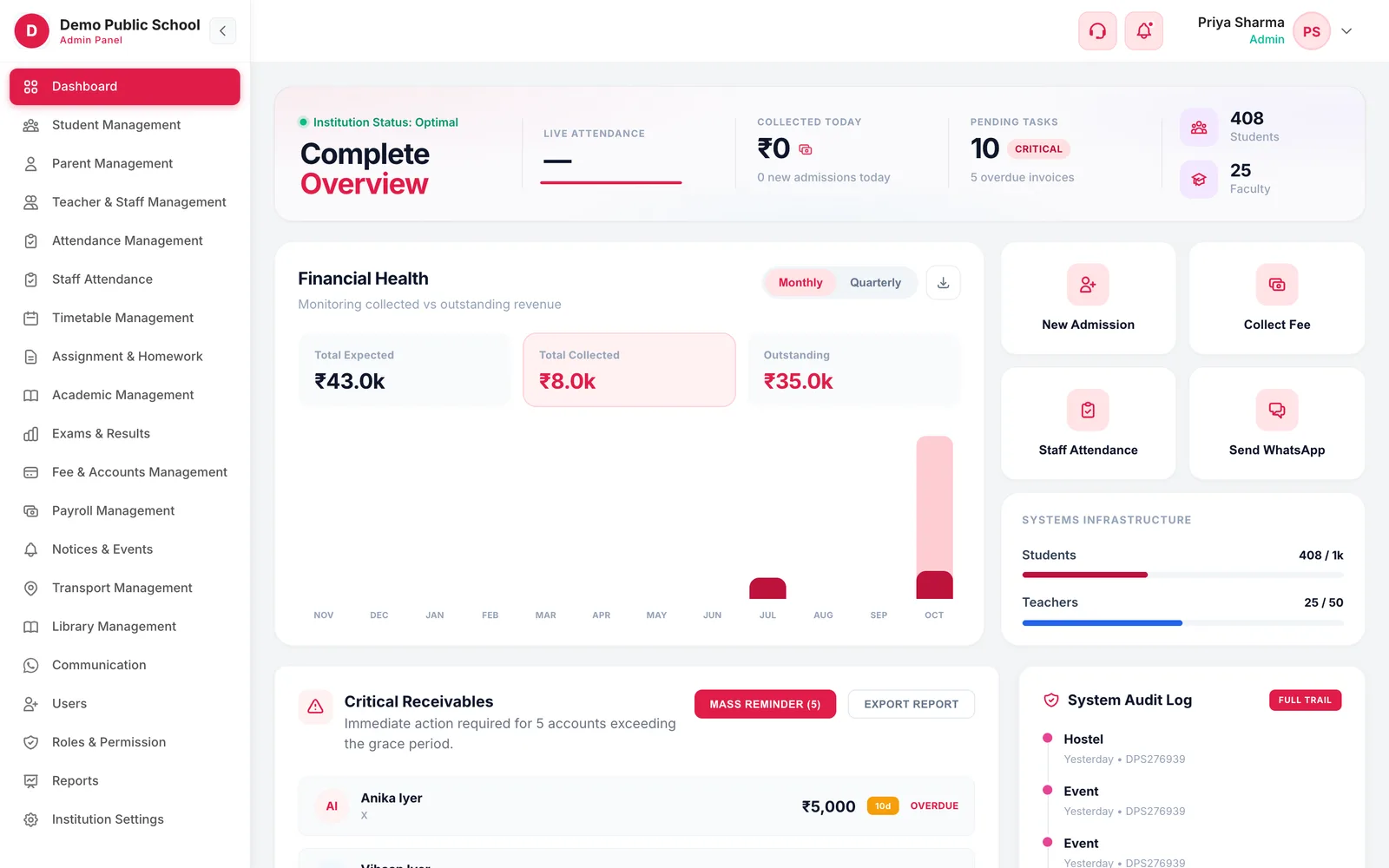
Campus 24x7 dashboard with live attendance, collected today, pending tasks, students and faculty, financial health and quick actions
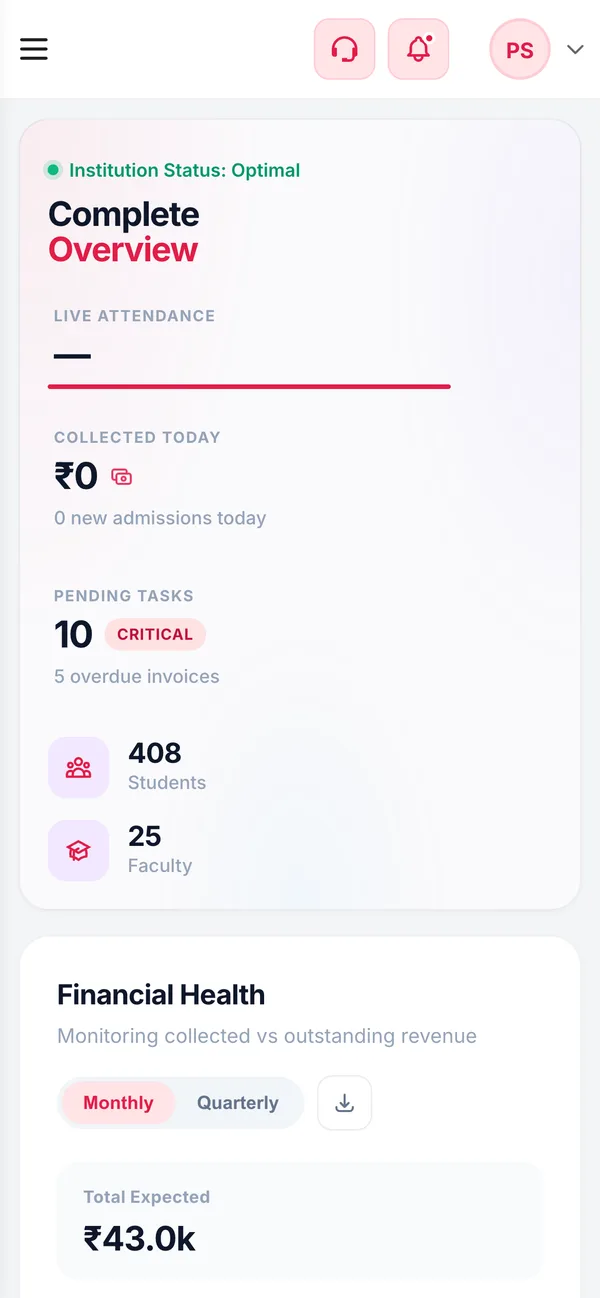
The Campus 24x7 dashboard on a phone
  • TodayAttendance and collectionPlus new admissions and pending tasks
  • 2Finance reportsFee collection and outstanding dues
  • CSVExportOpen any report in Excel or Sheets
  • 4Quick actionsAdmission, collect fee, staff attendance, WhatsApp
What it does

Inside Dashboard & Reports

Real screens from the Campus 24x7 admin app. Names and contact details are sample data.

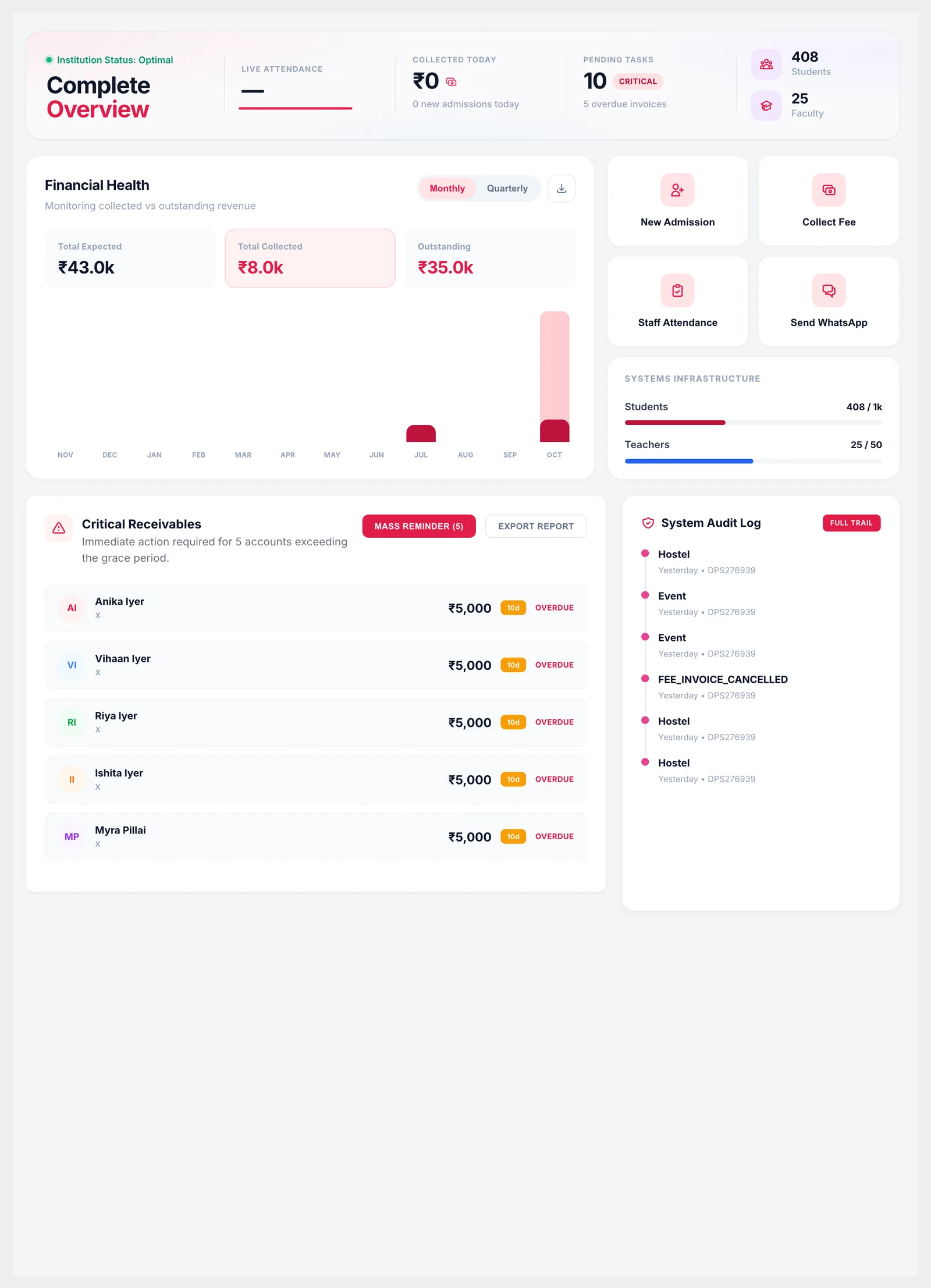
Dashboard with overview strip, financial health chart, quick actions, plan usage, critical receivables and system audit log
01Dashboard

The whole school on one screen

The dashboard opens with today's live attendance, the fees collected today, new admissions and pending tasks such as overdue invoices, alongside the number of students and faculty. Financial health compares expected, collected and outstanding fees month by month or quarter by quarter, and the critical receivables panel lists the families furthest past their grace period.

  • Live attendance, collected today and new admissions
  • Pending tasks, including overdue invoices
  • Expected, collected and outstanding fees, monthly or quarterly
  • Critical receivables: accounts past the grace period
  • Plan usage: students and teachers against your plan's limits
  • Latest entries from the system audit log
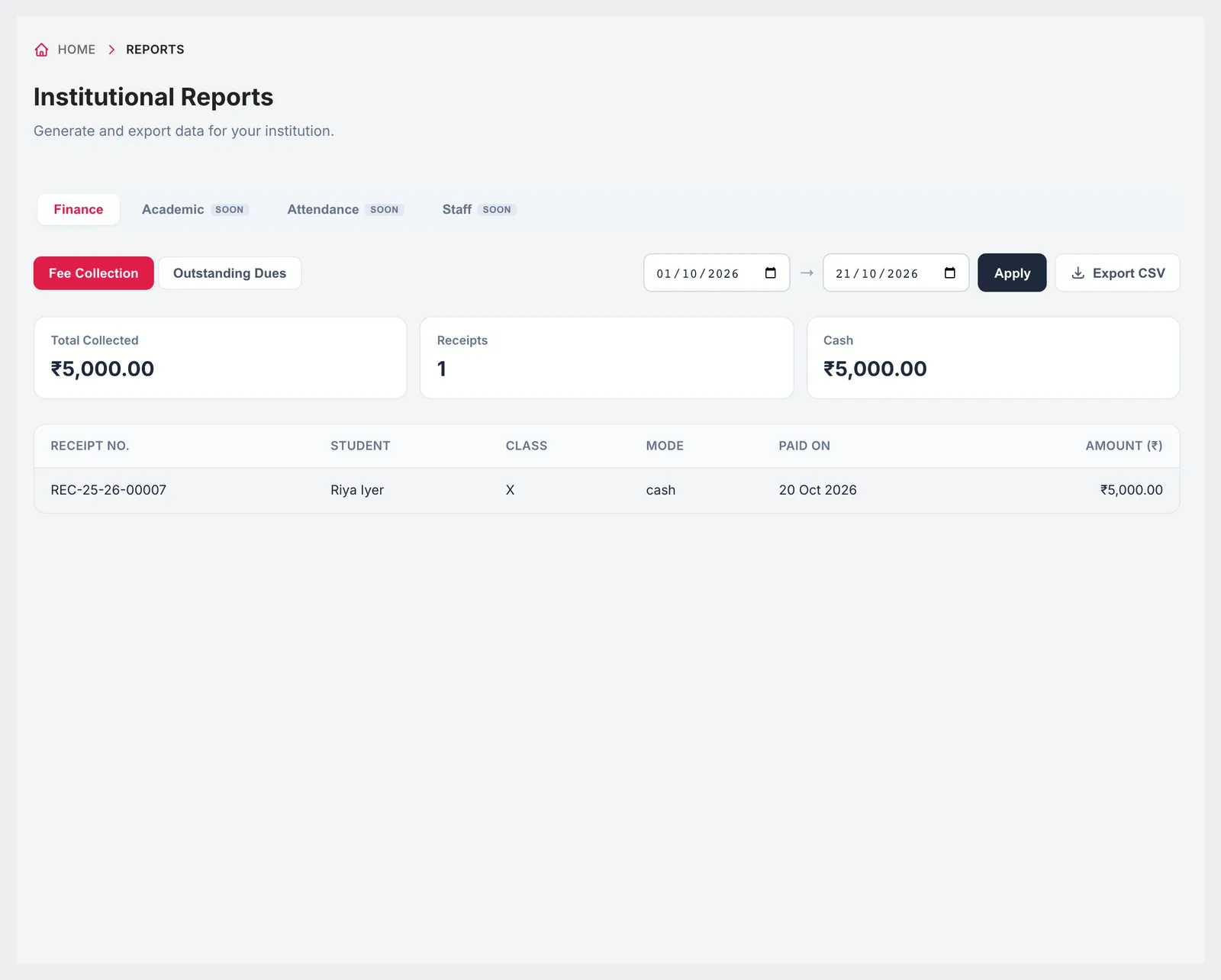
Fee Collection report with date range, total collected, receipts, totals by mode and receipt list
02Fee collection report

What came in, and how it was paid

Choose a date range and the fee collection report lists every receipt with its number, student, class, payment mode, date and amount, with the total collected, the number of receipts and a breakdown by payment mode at the top. Export it as CSV for the accountant or the management committee.

  • Any date range
  • Total collected and number of receipts
  • Totals by payment mode
  • Receipt-level detail with student and class
  • Export CSV
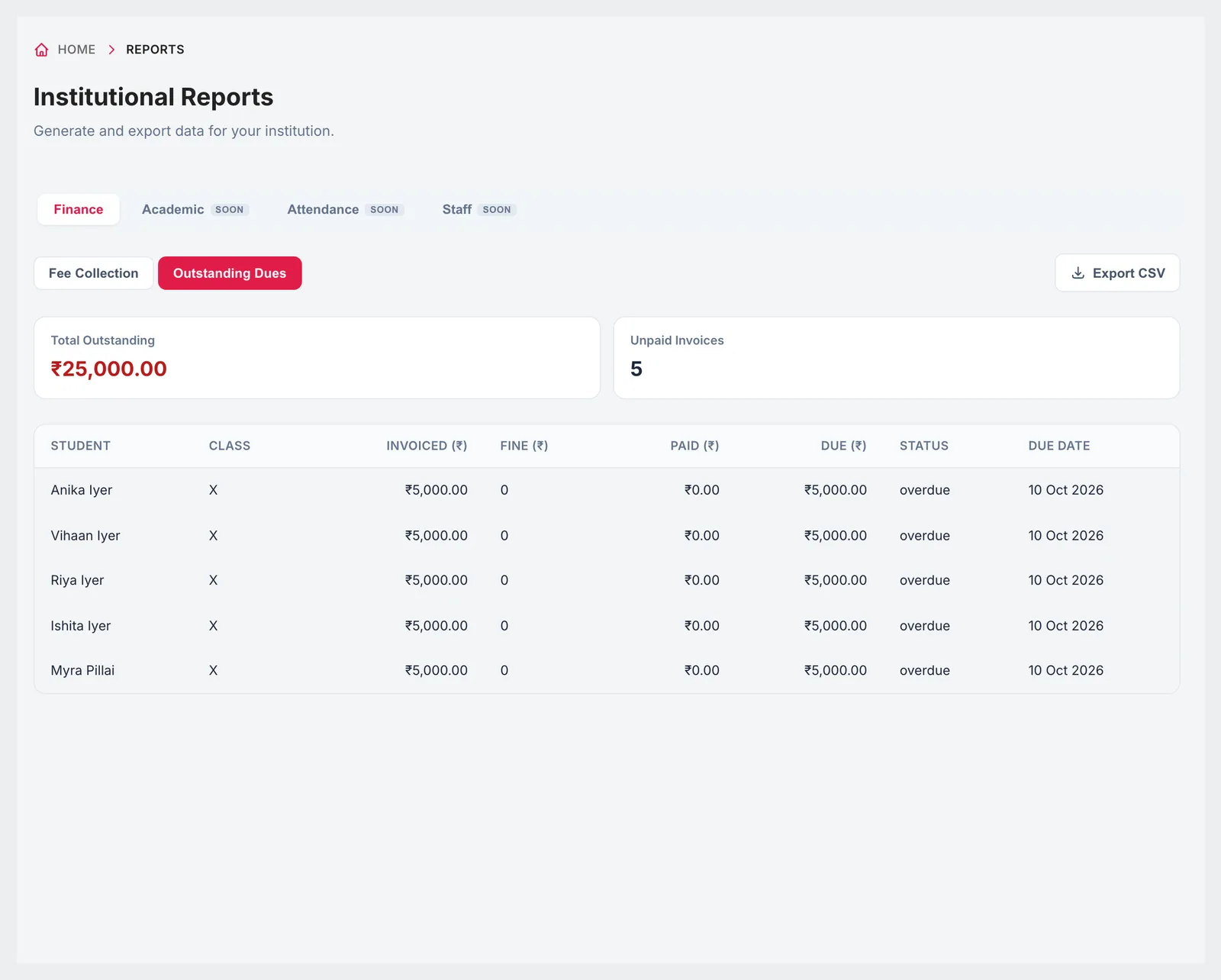
Outstanding Dues report with total outstanding, unpaid invoices and a list with invoiced, fine, paid, due, status and due date
03Outstanding dues report

Who still owes, and how much

The outstanding dues report lists every unpaid invoice with the student, class, amount invoiced, fine, amount paid, balance due, status and due date, with the total outstanding and the number of unpaid invoices at the top — the list your accounts team needs before a reminder round or a meeting with parents.

  • Total outstanding and number of unpaid invoices
  • Invoiced, fine, paid and due per student
  • Overdue status and due date
  • Export CSV
The Campus 24x7 dashboard on a phone
Responsive

The principal's morning check, on a phone

The dashboard is built to be read on a phone: today's attendance, collection and overdue accounts are the first things on screen, without opening a laptop.

  • Dashboard in any phone browser
  • Quick actions one tap away
  • What each person sees depends on their role

Included in every plan

The dashboard and the finance reports are part of every Campus 24x7 plan, and the first two months cost ₹0.

  • Foundation — up to 500 students, ₹2,999 a month
  • Growth — up to 1,000 students, ₹4,999 a month
  • Scale — up to 2,500 students, ₹10,999 a month
Compare plans

Good to know

Reports that are not available yet.

  • Academic, attendance and staff reports are marked as coming soon in the Reports module; today the finance reports are the ones you can run and export.
  • Exam analytics (averages, grade distribution, passing rate) live on the Examination & Results dashboard rather than in Reports.
FAQ

Questions schools ask

What does the dashboard show?

Today's attendance, fees collected today, new admissions, pending tasks such as overdue invoices, student and faculty counts, expected against collected fees, accounts past their grace period, plan usage and recent audit log entries.

Which reports can we export?

The fee collection report and the outstanding dues report, both as CSV.

Can we choose a date range?

Yes. The fee collection report runs for any date range you choose.

Are there attendance and academic reports?

They are marked as coming soon. Attendance can be reviewed in the daily, weekly and monthly views of the attendance page, and exam analytics are on the exams dashboard.

Can every staff member see the dashboard?

Each person sees what their role allows. Roles and permissions decide who can view fees, students and other modules.

See your school's numbers on one screen

We'll load a sample month in the demo and run the collection and dues reports with you. The first two months cost ₹0.