User Roles and Permissions for Your School ERP

Give every staff member their own login and exactly the access their job needs: start from ready-made roles such as principal, accountant, librarian and teacher, create your own with a permission matrix, and see who changed what in the audit log.

  • Ready-made school roles
  • Custom roles
  • Permission matrix per module
  • Audit log with CSV export
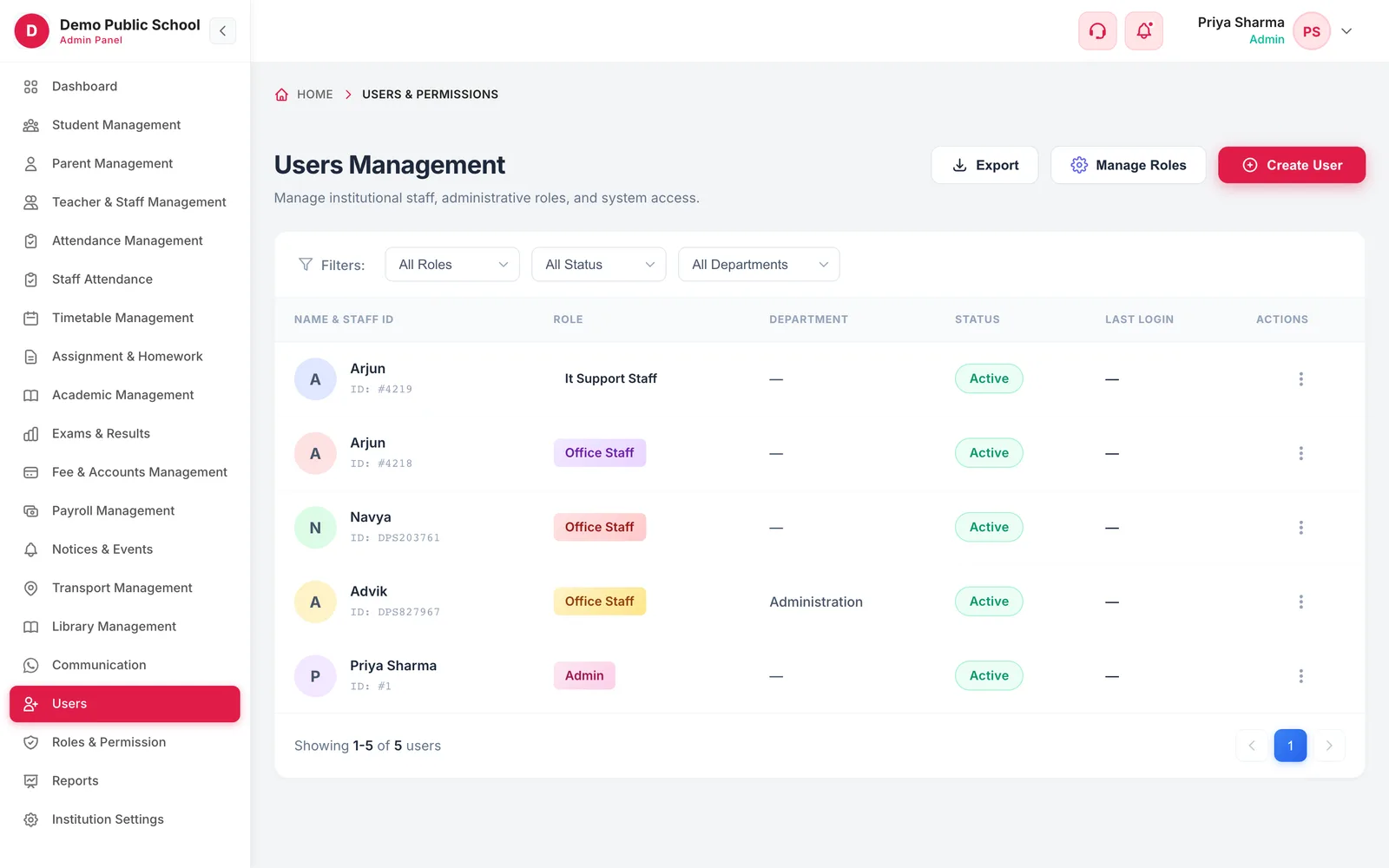
Users Management with filters by role, status and department and a list of staff users with role, department and status
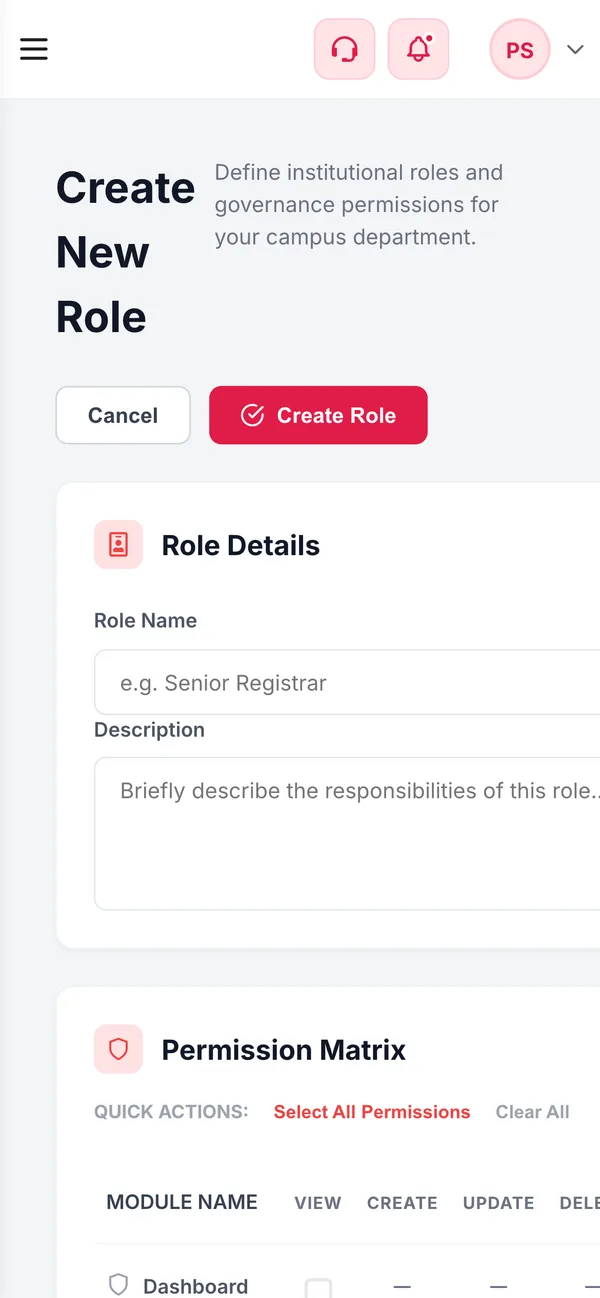
Create role permission matrix on a phone
  • 11Default rolesFrom admin and principal to driver
  • 19Modules in the matrixStudents and fees to WhatsApp and payroll
  • 7Permission typesView, create, update, delete, collect, manage, send
  • Up to 1 yrAudit log history30 days, 90 days or 1 year by plan
How it works

From setup to everyday use

  1. Review the default roles

    Admin, sub admin, principal, vice principal, accountant, IT support, librarian, teacher, student, parent and driver are ready to use.

  2. Create the roles you need

    Name a role, tick its permissions module by module, and check the summary.

  3. Add staff users

    Create each user with their role, employee ID, designation and contact details.

  4. Watch the trail

    The audit log records sign-ins and changes, filterable by date and action.

What it does

Inside Users, Roles & Permissions

Real screens from the Campus 24x7 admin app. Names and contact details are sample data.

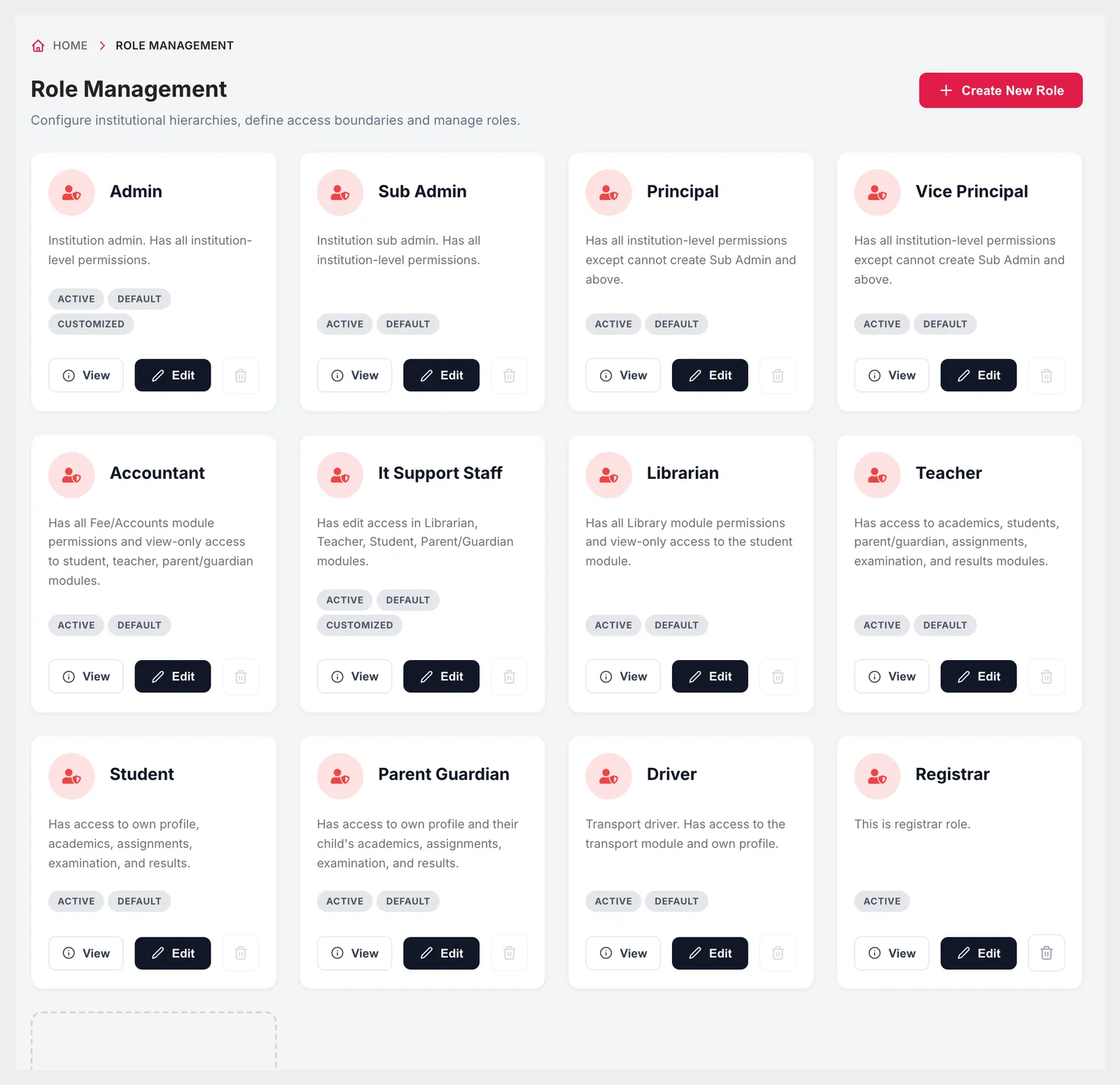
Role Management with role cards for admin, sub admin, principal, vice principal, accountant, IT support staff, librarian, teacher, student, parent guardian, driver and registrar
01Roles

School roles that already make sense

Every school starts with default roles described in plain language: a principal can do everything except create sub admins, an accountant has all fee and accounts permissions with view-only access to students, teachers and parents, a librarian has the library module, and so on. Defaults can't be renamed or deleted, and you can add your own roles beside them — a registrar, a coordinator, a transport in-charge.

  • Admin, sub admin, principal and vice principal
  • Accountant, IT support staff and librarian
  • Teacher, student, parent or guardian, and driver
  • Custom roles alongside the defaults
  • Defaults protected from rename and delete
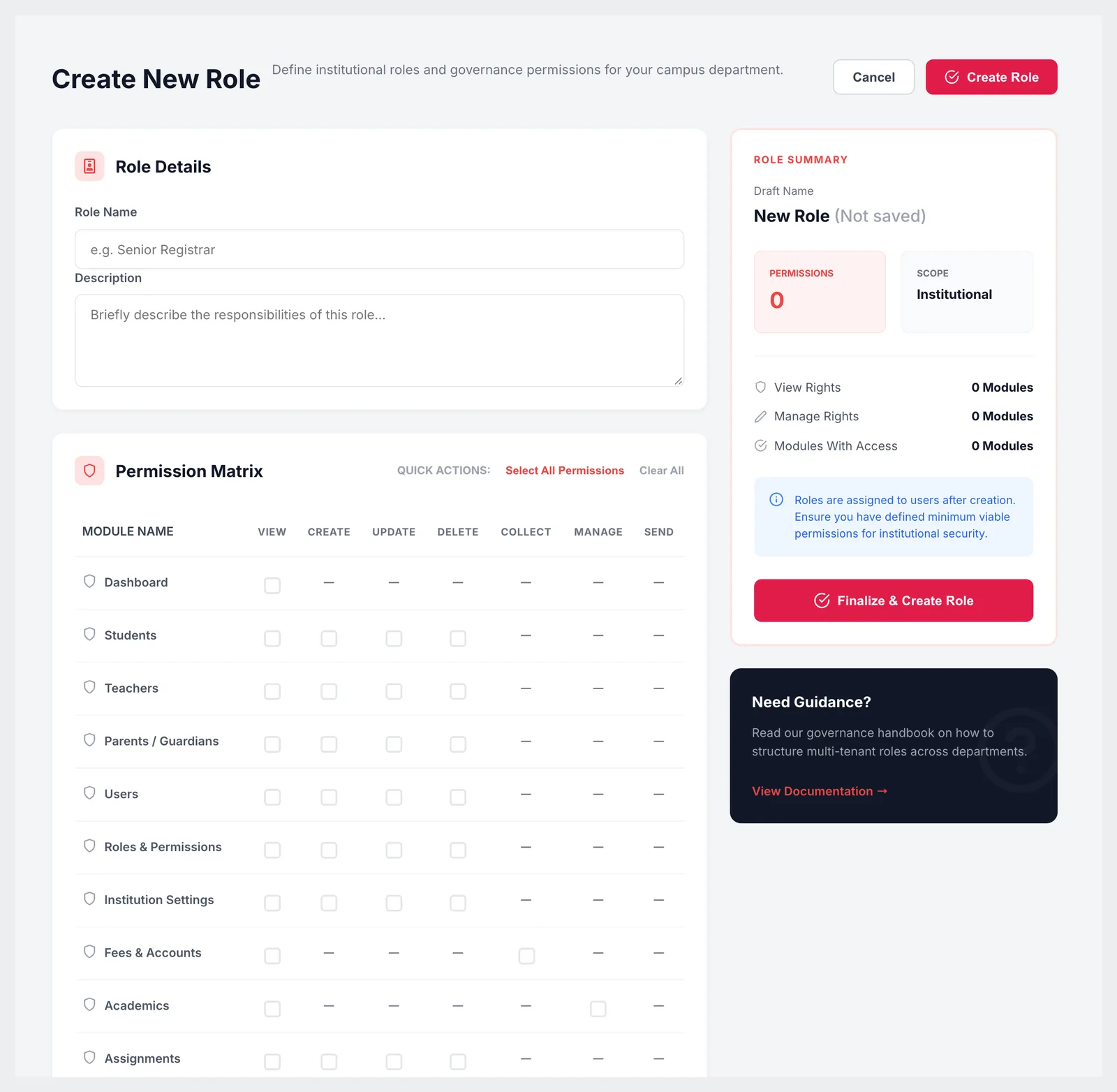
Create New Role with role details and a permission matrix of modules against view, create, update, delete, collect, manage and send
02Permission matrix

Tick exactly what each role can do

A role's permissions are set in a matrix: one row per module — dashboard, students, teachers, parents, users, roles, institution settings, fees, academics, assignments, examination, results, library, transport, attendance, payroll, profile, WhatsApp and notifications — and a column for each action that module supports. A summary shows how many permissions and modules the role covers, and editing an existing role asks for the reason for the change.

  • View, create, update, delete, collect, manage and send
  • Only the actions each module supports are offered
  • Select all or clear all in one click
  • Role summary before saving
  • Reason recorded when a role is changed
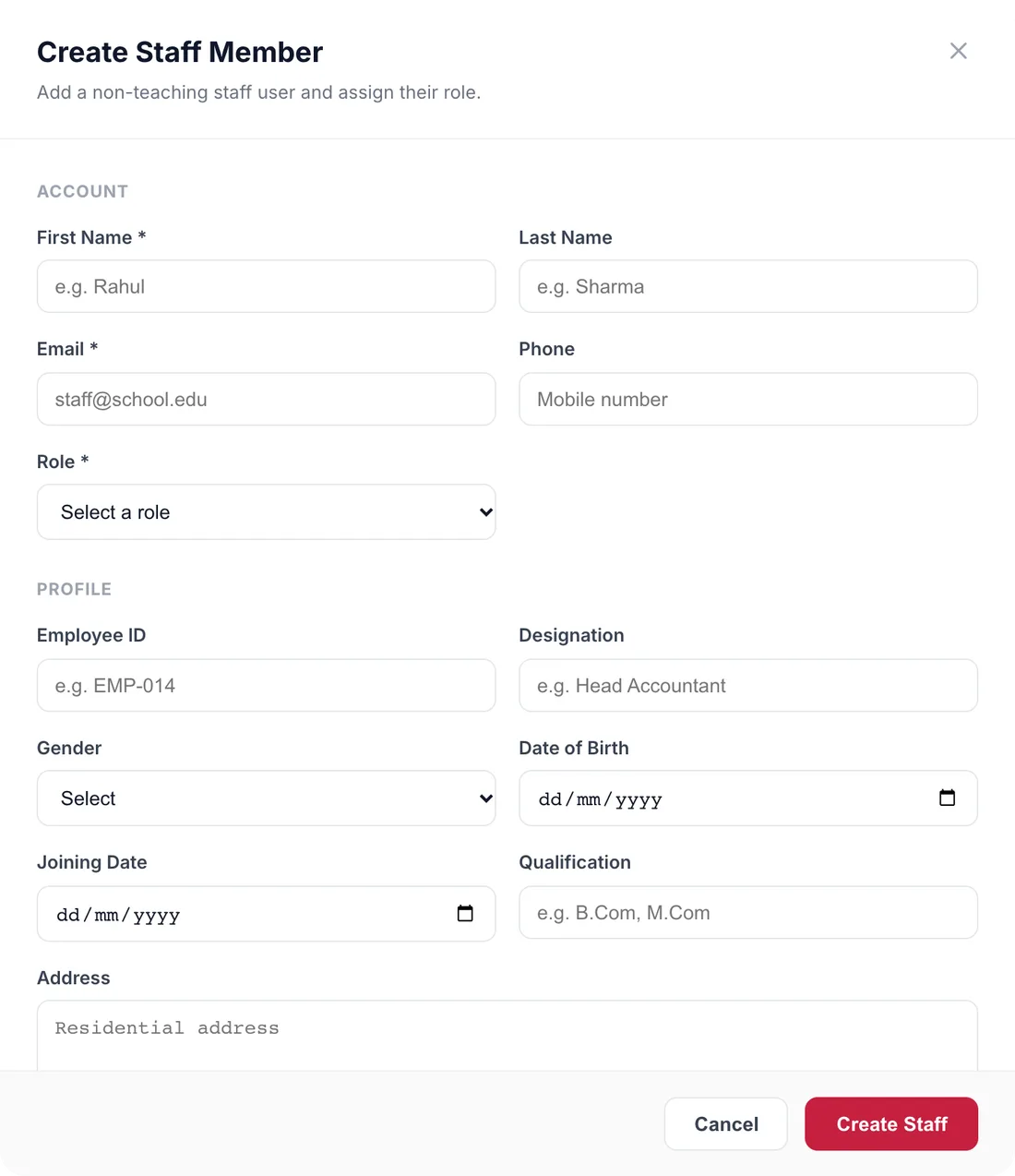
Create Staff Member dialog with account details, role, employee ID, designation, gender, date of birth, joining date, qualification and address
03Users

A named login for everyone who touches the data

Non-teaching staff are added as users with their name, email, phone and role, plus an employee ID, designation, gender, date of birth, joining date, qualification and address. The users list can be filtered by role, status and department, shows each person's last sign-in, and exports to CSV.

  • Create staff users with a role
  • Employee ID, designation, joining date and qualification
  • Filter by role, status and department
  • Active, suspended, pending and inactive statuses
  • Export the list as CSV
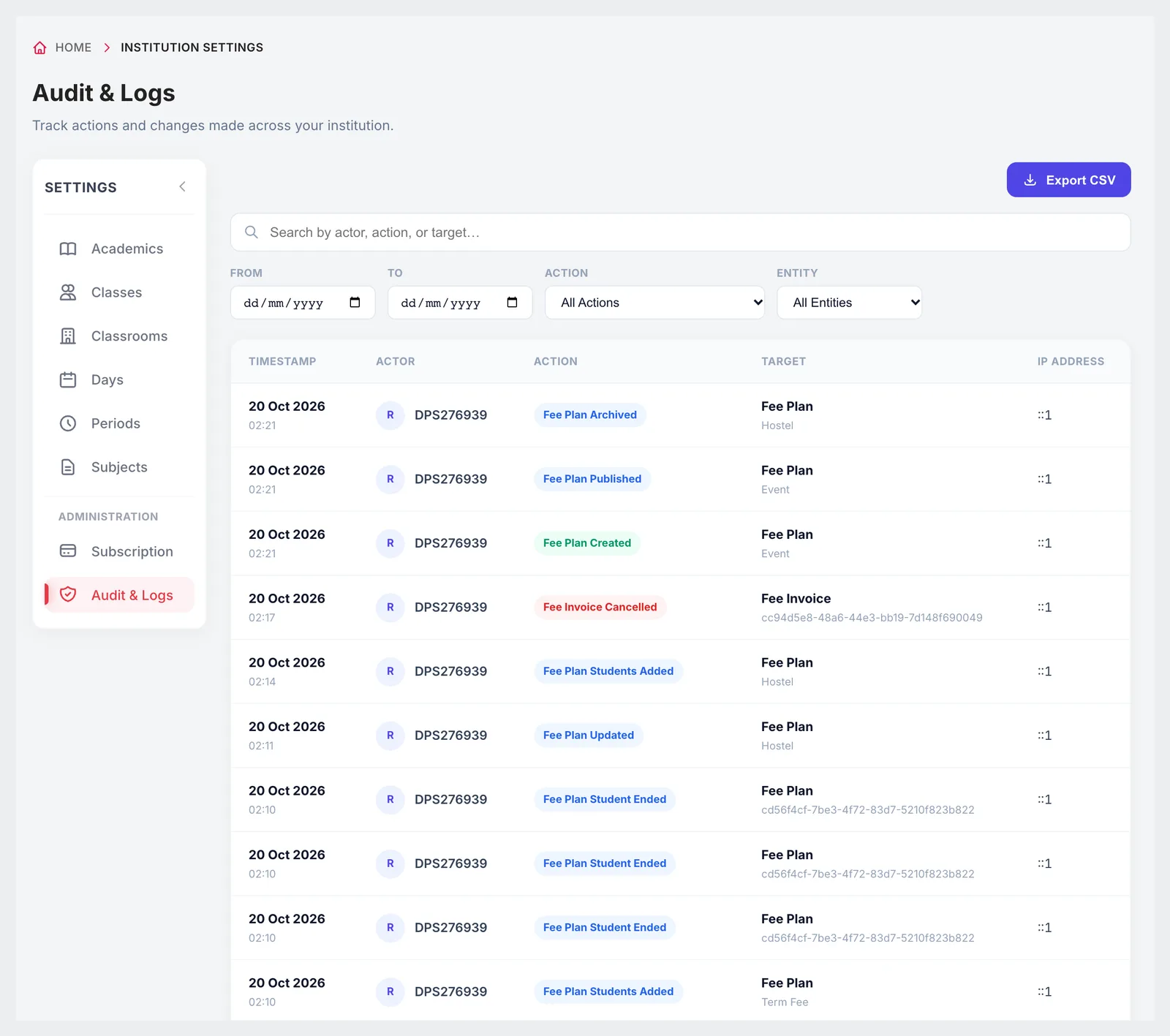
Audit & Logs with date range and action filters and export CSV
04Audit log

Who changed what, and when

The audit log records actions across the school — sign-ins, students created, updated or deactivated, passwords regenerated, fee plans published, invoices generated or cancelled, payments refunded, roles updated, timetables auto-generated and more. Filter by date range and action, and export the log as CSV when an auditor or the management committee asks.

  • Sign-ins and changes across modules
  • Filter by date range and action type
  • Export as CSV
  • History of 30 days, 90 days or 1 year depending on plan

Included in every plan

Roles, permissions and audit logs are part of every plan. Plans differ in how long the audit log is kept.

  • Foundation — 30-day audit log, ₹2,999 a month
  • Growth — 90-day audit log, ₹4,999 a month
  • Scale — 1-year audit log, ₹10,999 a month
Compare plans

Good to know

How users and roles are organised.

  • Teachers are added through Teacher & Staff Management; the users screen is for non-teaching staff.
  • Default roles can be edited but not renamed or deleted.
  • The role page does not yet list the users assigned to a role; filter the users list by role instead.
FAQ

Questions schools ask

Can we create our own roles?

Yes. Name the role, tick its permissions module by module in the matrix, and save. Custom roles sit alongside the defaults.

Which roles come ready-made?

Admin, sub admin, principal, vice principal, accountant, IT support staff, librarian, teacher, student, parent or guardian, and driver.

Can an accountant collect fees without seeing exam marks?

Yes. The default accountant role has fee and accounts permissions with view-only access to students, teachers and parents, and you can narrow any role further.

Is there an audit trail?

Yes. The audit log records sign-ins and changes across modules, can be filtered by date and action, and exports as CSV.

How long are audit logs kept?

30 days on Foundation, 90 days on Growth and one year on Scale.

Can we suspend a user without deleting them?

Yes. Users have active, suspended, pending and inactive statuses.

Map your staff to roles in the demo

Tell us who does what at your school and we'll set up the roles together. The first two months cost ₹0.