School Setup: Academic Years, Classes, Subjects and Periods

Set up your school once — board, academic years, classes and sections with their class teachers, classrooms, working days, periods and subjects, your logo and login screen — and every module from attendance to timetables and report cards works from the same structure.

  • CBSE, CISCE, state boards and more
  • Classes, sections and class teachers
  • Working days and periods
  • Your logo on the login screen
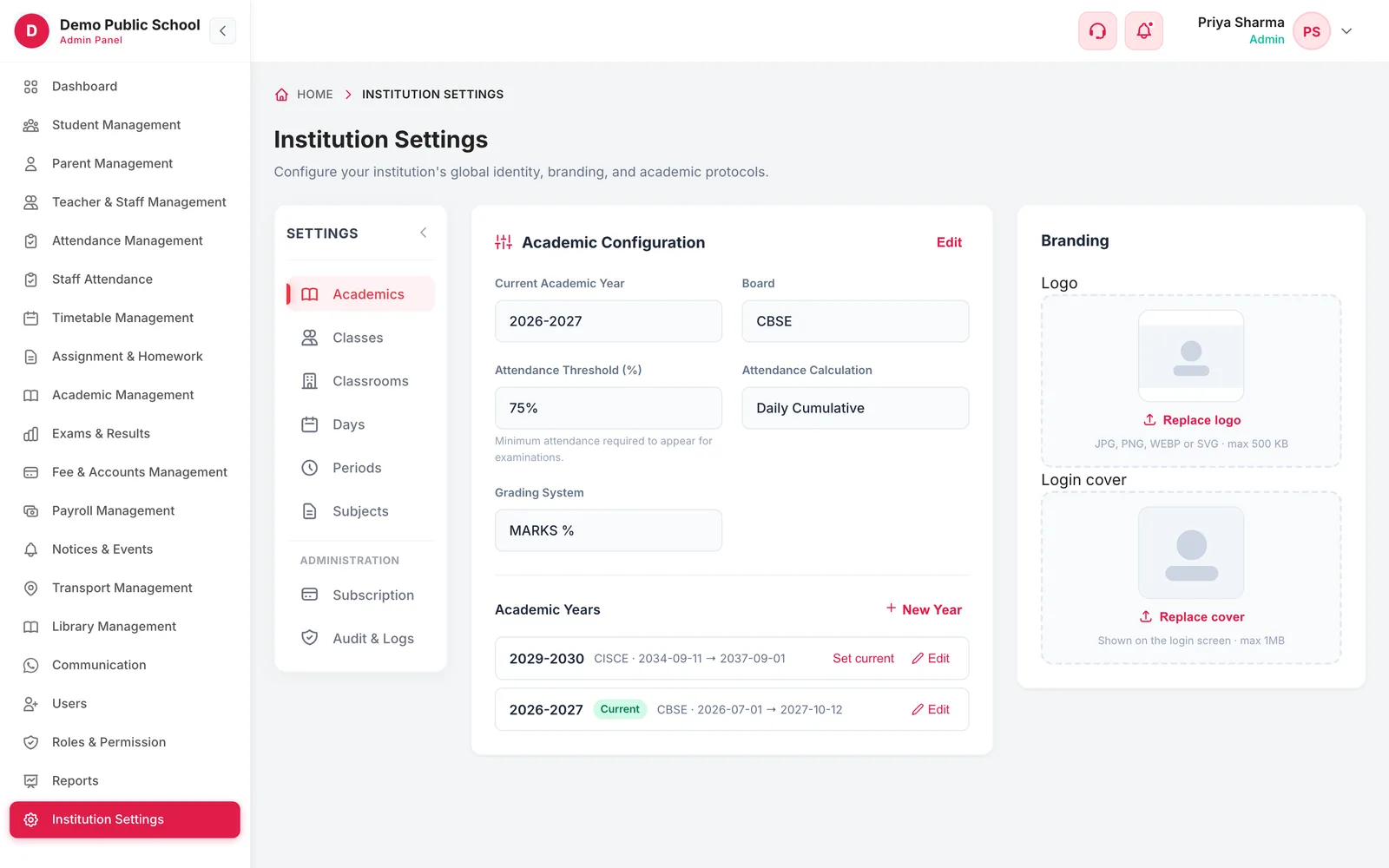
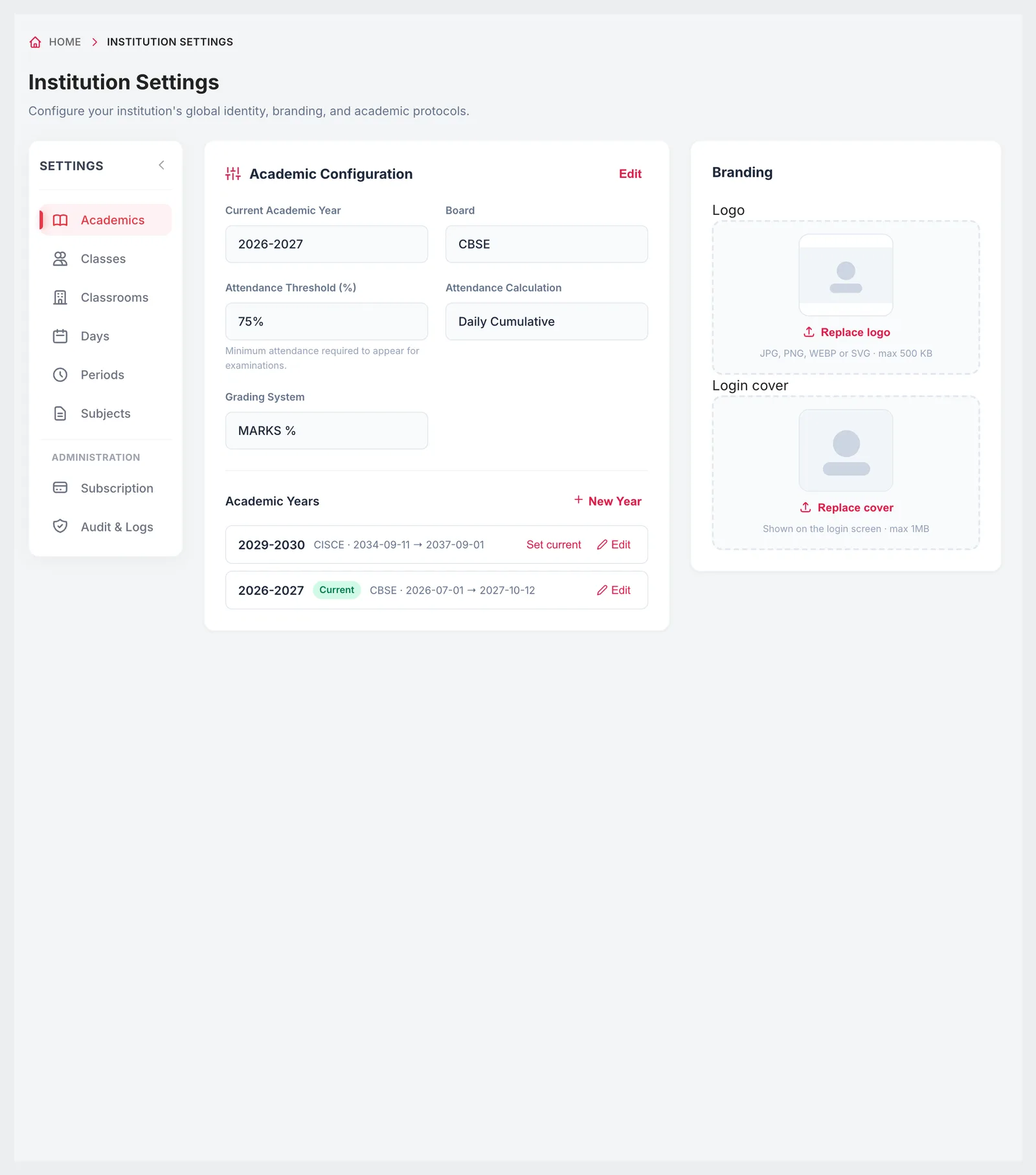
Institution Settings with academic configuration, academic years and branding
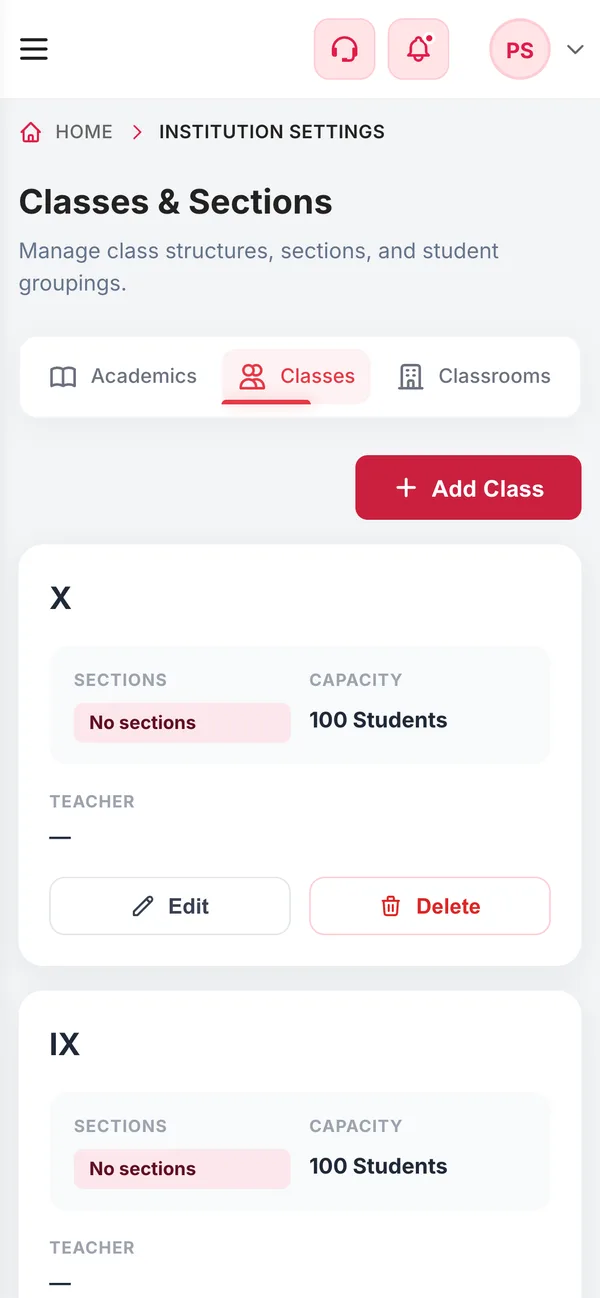
Institution Settings on a phone
  • AllIndian boardsCBSE, CISCE, NIOS, IB, IGCSE and state boards
  • 5Subject categoriesCore, elective, lab, language, sports
  • 3Grading systemsGPA, CGPA or marks percentage
  • 1Bell schedulePeriods and breaks shared by every class
How it works

From setup to everyday use

  1. Academic year and board

    Create the academic year with its dates, choose the board, the grading system and the attendance rule.

  2. Classes and sections

    Add each class with its sections, academic level, capacity and class teachers.

  3. Rooms, days and periods

    Add classrooms, tick the working days and define periods and breaks.

  4. Subjects and branding

    List subjects with codes and categories, then upload your logo and login cover.

What it does

Inside School Setup & Settings

Real screens from the Campus 24x7 admin app. Names and contact details are sample data.

Academic Configuration with current academic year, board, attendance threshold, grading system, academic years and branding
01Academic configuration

Board, academic year and the rules that follow from them

Choose your board — CBSE, ICSE / CISCE, NIOS, IB, IGCSE or any state board — and the grading system: GPA, CGPA or marks percentage. Set the minimum attendance for exams and how attendance is calculated. Academic years have their own start and end dates, and one is marked current so every module knows which year it is working in.

  • Central, international and every state board
  • GPA, CGPA or marks percentage
  • Attendance threshold and calculation method
  • Academic years with start and end dates; one set as current
  • Logo (up to 500 KB) and login cover image (up to 1 MB)
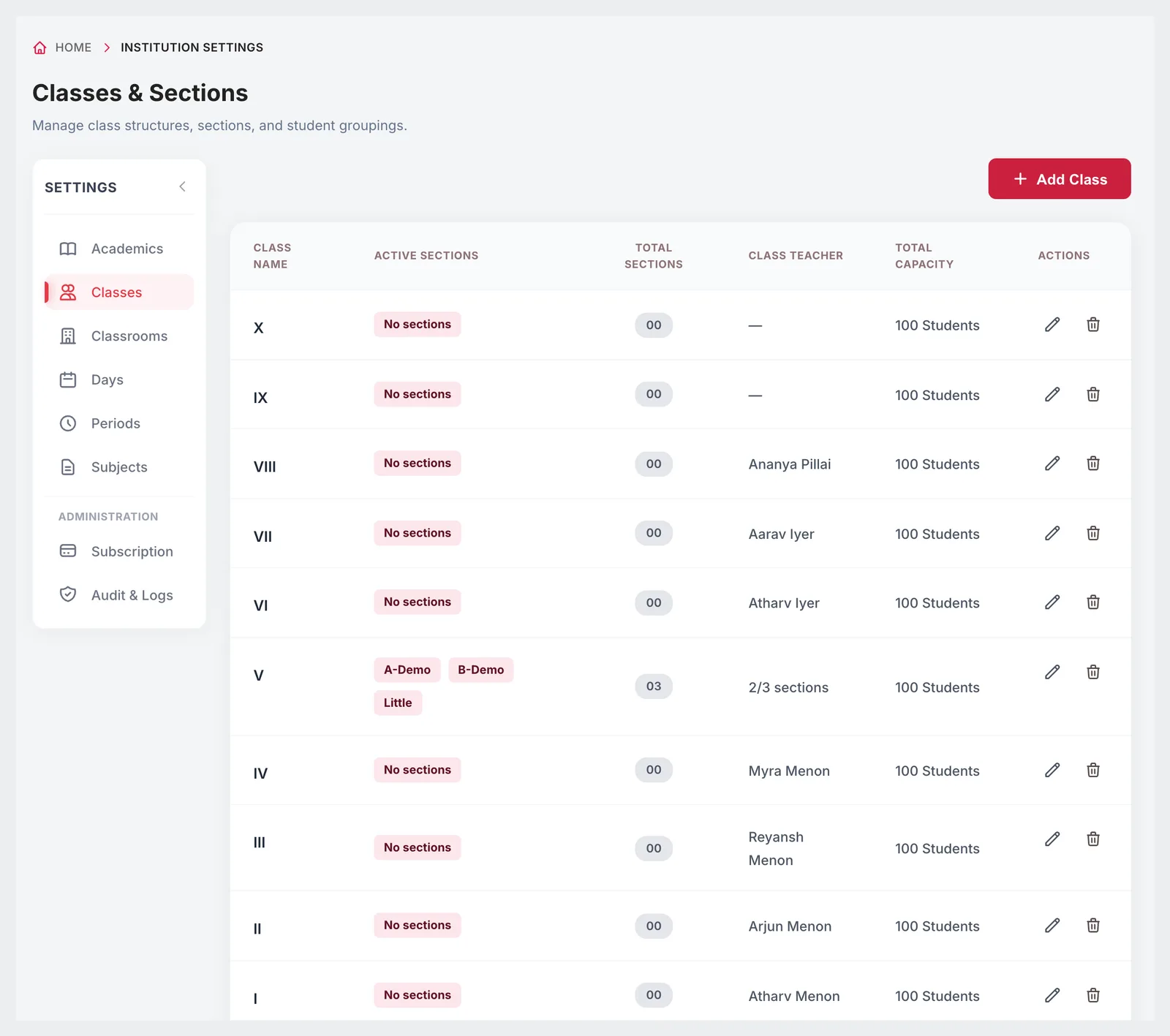
Classes & Sections list with active sections, total sections, class teacher and total capacity for each class
02Classes and sections

Your class structure, from nursery to class 12

Add each class with its academic level and sections, set a capacity, and assign a class teacher — to the class, or to each section separately when it has sections. The list shows active and total sections, class teachers and total capacity for every class.

  • Classes with academic level and sections
  • Class teacher per class or per section
  • Capacity per class and section
  • Active and total sections at a glance
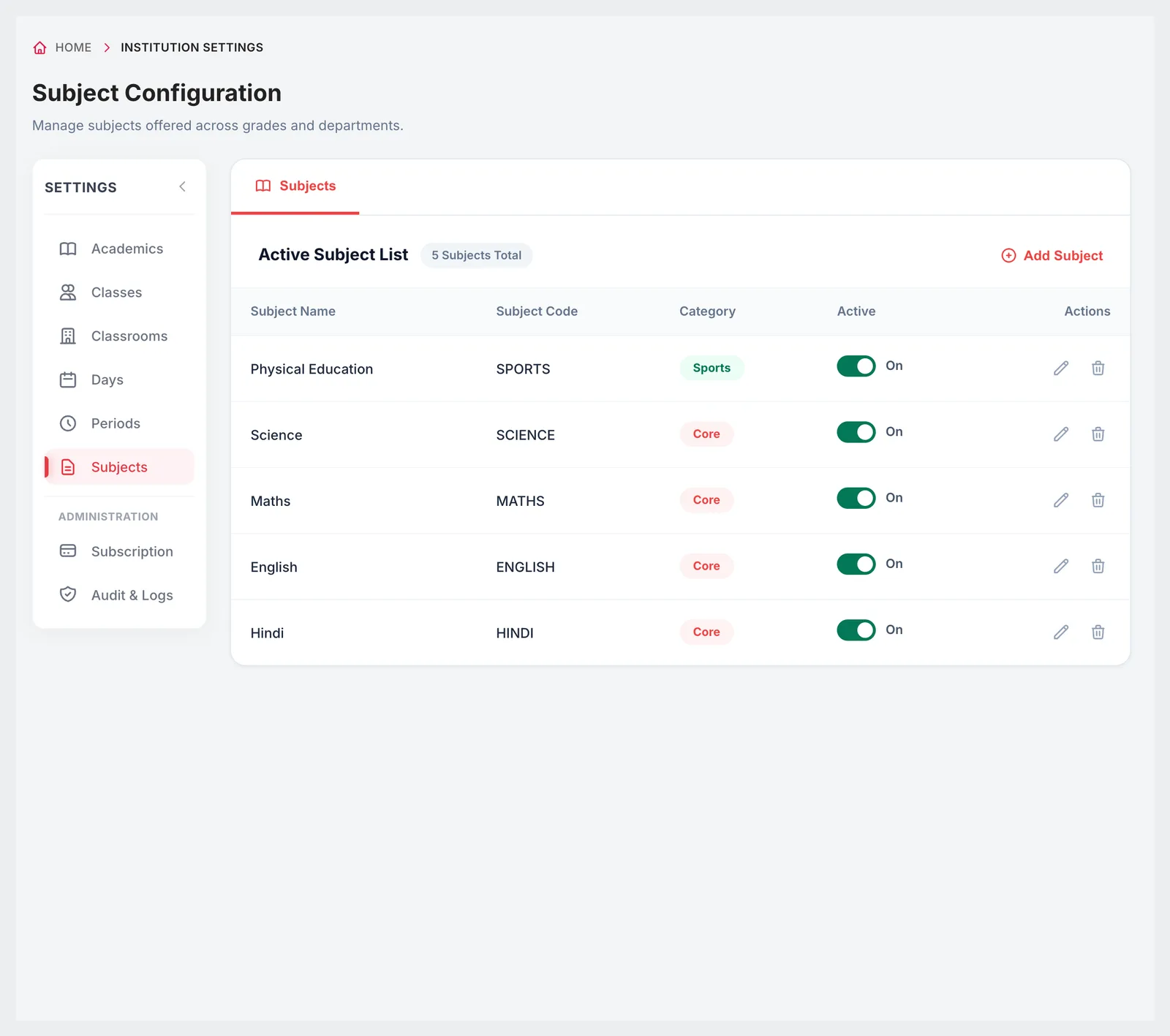
Subject Configuration with subject name, code, category and active switch
03Subjects

Subjects with codes and categories

Keep one list of the subjects your school teaches, each with a code and a category — core, elective, lab, language or sports — and switch a subject off when it is no longer offered. These subjects are used in subject assignments, timetables, homework and exams.

  • Subject name and code
  • Core, elective, lab, language or sports
  • Active or inactive
  • Used across timetable, homework and exams
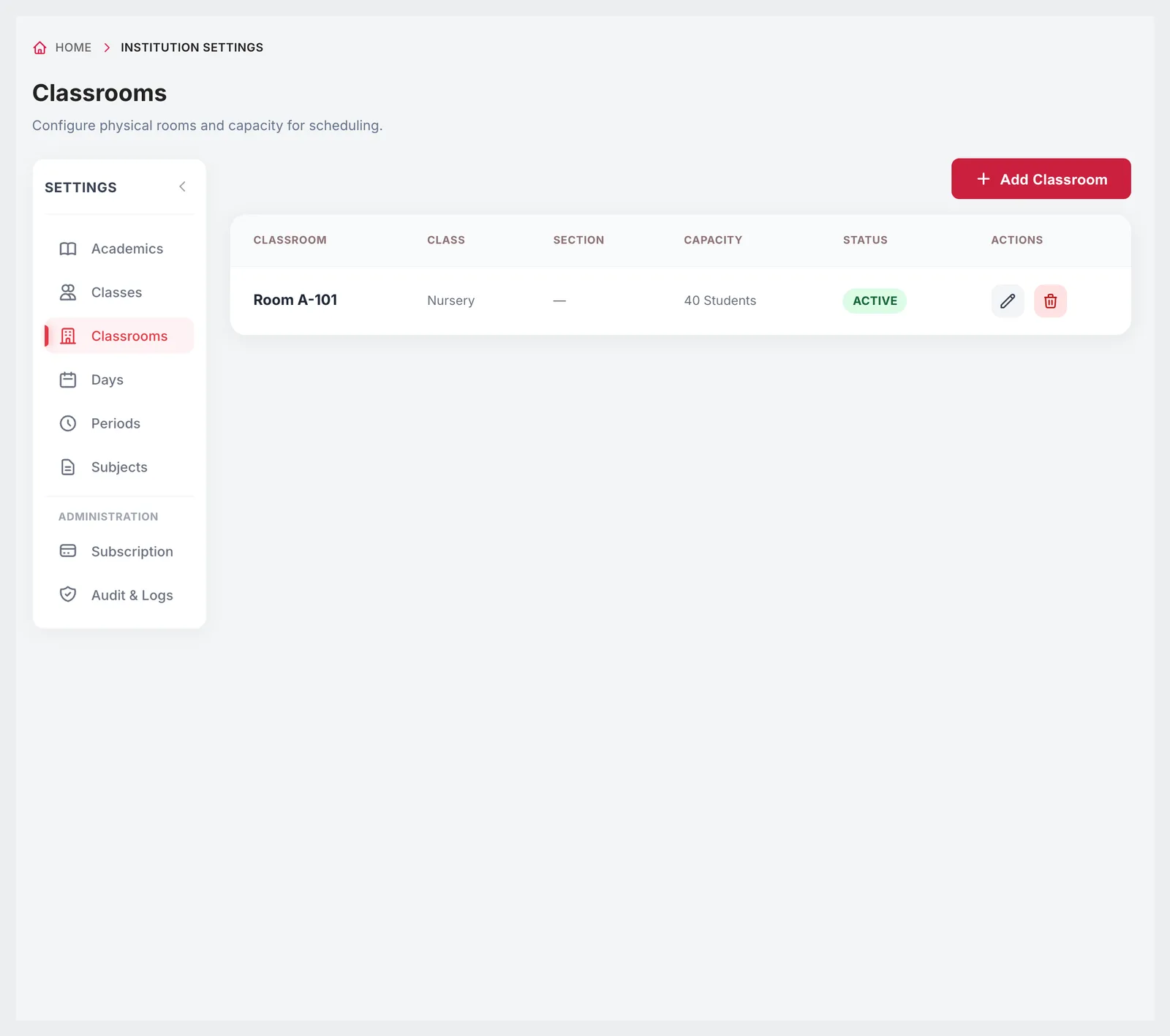
Classrooms list with classroom, class, section, capacity and status
04Classrooms and working days

Rooms and the school week

Add classrooms with their capacity and the class and section that normally sit there, so timetables can check room clashes. Tick the days your school works — Monday to Saturday, or a five-day week — and the timetable grid and attendance follow that calendar. Periods and breaks with their times complete the school day.

  • Classrooms with capacity and assigned class and section
  • Active or inactive rooms
  • Working days from Monday to Sunday
  • Periods and breaks with start and end times
Institution Settings on a phone
Responsive

Settings that stay out of the way

Most of this is done once at the start of the year. When something changes — a new section, a new subject, a changed bell schedule — it takes a minute, even from a phone.

  • Change settings from a phone browser
  • Who can change settings is decided by role
  • Academic year and institution changes recorded in the audit log

Included in every plan

School setup comes with every Campus 24x7 plan, and our onboarding team helps you set it up.

  • Foundation — up to 500 students, ₹2,999 a month
  • Growth — up to 1,000 students, ₹4,999 a month
  • Scale — up to 2,500 students, ₹10,999 a month
Compare plans

Good to know

Worth doing in the right order.

  • Set up the academic year, classes and subjects before importing students or building timetables.
  • Logos must be JPG, PNG, WEBP or SVG up to 500 KB; the login cover can be up to 1 MB.
FAQ

Questions schools ask

Which boards does Campus 24x7 support?

CBSE, ICSE / CISCE, NIOS, IB, IGCSE and the state boards, with an 'Other' option for anything not listed.

Can each section have its own class teacher?

Yes. A class without sections has one class teacher; a class with sections can have a different class teacher for each section.

Can we run a six-day week?

Yes. Tick the working days your school follows, from Monday to Sunday.

Can we add our school logo?

Yes. Upload a logo (JPG, PNG, WEBP or SVG, up to 500 KB) and a cover image for the login screen (up to 1 MB).

Which grading systems are available?

GPA, CGPA or marks percentage, with grade bands configured in the exam settings.

Do we have to set all this up ourselves?

No. Onboarding is included in the plan price, and we help you set up the academic year, classes and subjects.

Get your school set up with us

Bring your class list and timetable to a demo and we'll set up the structure together. The first two months cost ₹0.